# EMC 概述

<figure><img src="https://1412687580-files.gitbook.io/~/files/v0/b/gitbook-x-prod.appspot.com/o/spaces%2FAV1WE0GjBZ37BF6lF45G%2Fuploads%2F9K5dBpZ0nJmCyQTy5igP%2Fimage.png?alt=media&amp;token=3ee0ab4b-af5c-4259-bdc2-532ba7359f95" alt=""><figcaption></figcaption></figure>

**EMC**（Edge Matrix Chain）是一条**DeAI（Decentralized AI）**&#x7684;EVM L1公链。 它构建了一个Web3 时代的全球AI算力网络基础设施、**生态枢纽及标准化 AI Agent 工厂**，为新一波爆发式增长的**AI电子消费品以及AI资产的发行和交易提供了底层技术**。由此构建起完整的 AI 经济闭环，使开发者、硬件制造商、投资者和普通用户都能参与到 AI 经济体系中。EMC的核心愿景是打破传统 AI 产业的中心化壁垒，通过Web3 经济模型调动全球算力参与其中，加速 AI 产业的去中心化发展。

## 市场痛点

1. **GPU 供需失衡**
   * 随着 AI Agents（智能代理）在交易执行、预测分析、游戏互动、DeFi 风控等领域加速落地，高性能 GPU 需求激增；
   * 传统云平台集中度高、算力成本昂贵，中小团队和个人开发者难以负担并及时获取资源。
2. **跨链与隐私要求**
   * AI 模型往往需要与多条区块链、预言机及机密数据交互，现有中心化方案缺乏对隐私合规与多链互操作的全面支持。
3. **项目孵化与资金难题**
   * AI 项目除了算力，还需要技术指导、资金支持及社区背书，单纯的 GPU 供给尚不足以支撑其突破“原型”阶段并走向大规模应用。
4. **软硬件割裂**
   * AI 电子消费品和 AI 软件代理之间存在研发、应用、供应链等分割现象，难以形成完整生态；投资者与硬件制造商也缺乏灵活、多元的投融资渠道。

\
**EMC** 致力于解决这些痛点
-----------------

* 通过 **去中心化 GPU 网络** 释放全球算力潜能，显著降低 AI 项目运营成本；
* 以 **资金扶持、孵化工具、技术协作** 等方式，为真正有潜力的 AI 团队提供全方位护航；
* 借助 **跨链互操作与隐私扩展**，使 AI Agents 能在多链环境中安全、高效地运行。

## EMC 的两大核心

1. **EMC 公链（Edge Matrix Chain）**
   * 基于 **EVM 兼容** 的 Layer-1 区块链，具备 **高吞吐量** 与 **可定制** 的共识机制，满足 AI 项目对实时交易和智能合约执行的需求；
   * 提供 **跨链桥**，支持与其他 EVM 兼容网络（如 Arbitrum One，Base 等）进行资产与数据互通；
2. **EMC Hub（EMC Protocol、生态枢纽与孵化器）**
   * 提供按需、低成本的 AI 推理算力API；
   * 预言机，获取AI任务输入数据并生成哈希指纹。
   * 借由「节点质押 + 算力激励」方案，保证网络公平与算力质量，让更多人能获得弹性算力供给；
   * 面向企业与个人开发者，提供 **算力调度、资金支持、技术协作、社区运营** 等综合服务；
   * 整合“奖励池”与“项目孵化”机制，通过统一接口与资源平台，使 AI 团队在更短周期内完成项目落地与验证。

\
**通过以上，EMC 不仅实现了对全球 GPU 资源的去中心化整合，也为 AI 电子消费品与智能软件代理提供了代币化、交易和多链协作的完备环境。** 借助 **跨链互操作、隐私扩展** 及 **多方资金孵化**，任何团队或个人都能在更公平、开放的生态中快速将 AI 创意转化为落地应用，一同推动 Web3 AI 产业的蓬勃发展。


# 核心产品

EMC 致力于成为新一代去中心化 AI 与硬件融合的基础设施。其核心产品充分体现了这一愿景：通过一条 EVM 兼容的公链、强大的跨链桥（Bridge）以及用于统筹边缘计算资源的综合性 Hub，EMC 为开发者、硬件提供商和终端用户提供了一个协同合作的完整生态环境。

其中，EMC 公链承担可扩展性、跨链互操作性和网络安全等基础功能；跨链桥则连接 EMC 生态与其他 EVM 兼容网络，实现资产的无缝转移和跨链协作；而 EMC Hub 则是整个生态的核心运营枢纽，用于管理算力任务、验证 AI 工作负载，并协调 AI Agent 的整个生命周期。通过这三大核心产品的协同运作，EMC 为全球参与者在去中心化 AI、硬件解决方案与现实资产代币化等领域开辟了广阔的创新与发展机遇。<br>

<table data-card-size="large" data-view="cards"><thead><tr><th data-type="content-ref"></th><th data-hidden></th></tr></thead><tbody><tr><td><a href="/emc/zhong-wen/emc-network/he-xin-chan-pin/gong-lian">公链</a></td><td></td></tr><tr><td><a href="/emc/zhong-wen/emc-network/he-xin-chan-pin/emc-hub">EMC Hub</a></td><td></td></tr></tbody></table>


# 公链

EMC链是一个 Ethereum兼容的EVM公链，目前通过集中式跨链桥实现了与Arbitrum One、Base等公链的ERC-20代币双向传输，各类行业标准钱包可通过JSON-RPC端点与EMC链交互。

<table data-card-size="large" data-view="cards"><thead><tr><th data-card-target data-type="content-ref"></th></tr></thead><tbody><tr><td><a href="/emc/zhong-wen/emc-network/he-xin-chan-pin/gong-lian/lian-wang-luo-xin-xi">链网络信息</a></td></tr><tr><td><a href="/emc/zhong-wen/emc-network/he-xin-chan-pin/gong-lian/gong-shi-ji-zhi-poaw">共识机制 PoAW</a></td></tr><tr><td><a href="/emc/zhong-wen/emc-network/he-xin-chan-pin/gong-lian/qu-kuai-can-shu">区块参数</a></td></tr><tr><td><a href="/emc/zhong-wen/emc-network/he-xin-chan-pin/gong-lian/jiao-yi-performance">交易Performance</a></td></tr><tr><td><a href="/emc/zhong-wen/emc-network/he-xin-chan-pin/gong-lian/json-rpc">JSON RPC</a></td></tr><tr><td><a href="/emc/zhong-wen/emc-network/he-xin-chan-pin/gong-lian/lian-qiao">链桥</a></td></tr><tr><td><a href="/emc/zhong-wen/emc-network/he-xin-chan-pin/gong-lian/dex">Dex</a></td></tr></tbody></table>


# 链网络信息

## Mainnet链网络信息

> **网络名称：**&#x45;dge Matrix Chain
>
> **默认RPC：**<https://rpc1-mainnet.emc.network>
>
> **链ID：**&#x36;678
>
> **货币符号:** EMC
>
> **货币精度:** 18
>
> **区块链浏览器URL:** <https://emcscan.com>
>
> **Chainlist URL**：<https://chainid.network/chain/6678/>

## Sepolia链网络信息

> **网络名称：**&#x45;dge Matrix Chain Sepolia
>
> **默认RPC：**<https://rpc1-mainnet.emc.network>
>
> **链ID：**&#x36;678
>
> **货币符号:** EMC
>
> **货币精度:** 18
>
> **区块链浏览器URL:** [**https://sepolia.emcscan.com**](https://sepolia.emcscan.com)
>
> **Chainlist URL**：<https://chainid.network/chain/99879/>


# 共识机制 PoAW

EMC 链采用 **PoAW（Proof of AI Work）** 权益证明通过在公链上运行的资产化的AI Agent来验证交易和维护网络安全，旨在提高区块链的真实应用效率和AI的去中心化特性。

### **1. 分层结构**

* 执行层：兼容EVM的智能合约引擎，支持AI任务调度合约
* 共识层：改良的伊斯坦布尔BFT共识机制，集成AI工作量验证模块
* 存储层：混合式存储架构（链上元数据+IPFS/Filecoin数据存储）
* 跨链层：支持多链资产互操作的桥接协议

### **2. 核心组件**

* **资产化的AI代理**：每个AI Agent代表一定的代币资产或硬件资源，AI Agent由EMC公链的算力节点产生，用户可以通过质押EMC来激活AI Agent。
* **智能合约**：AI Agent通过智能合约与区块链交互，执行复杂的计算和决策。
* AI Agent管理合约：处理质押、激活、权重计算
* 预言机网络：提供外部数据输入和验证服务
* 任务验证节点：执行拜占庭容错的任务结果验证

### **3. 质押规则：**

* 最低质押量：3000 EMC（动态可调整）
* 权重计算公式：

$$
\ \sqrt{\frac{\text{质押量}}{\text{基础阈值}}} \times \frac{\text{任务数}}{\text{AI Agent质押总量}}
$$

* 质押锁定周期：与任务执行周期挂钩（最少90天）
* **奖励机制**：成功参与共识的AI代理将根据其权重获得奖励，激励其持续参与网络维护。

### **4. 工作量验证流程**

* **交易提交**：用户提交交易请求，AI代理接收并验证请求。
* **计算验证**：AI代理通过计算验证交易的有效性，并生成结果的哈希指纹。
* **数据验证**：采用Merkle Patricia Tree结构存储哈希指纹。
* **结果广播**：哈希指纹通过网络广播，经由验证节点进行IBFT。
* **达成共识**：一旦达到2/3的验证阈值，交易被记录在区块链上。

### **5. 工作量验证流程安全性与去中心化**

* **多样性**：鼓励不同类型的AI代理参与共识，增强网络的多样性和安全性。
* **动态调整**：根据网络状态动态调整质押要求和奖励机制，确保网络稳定性。


# 区块参数

* 区块平均产生时间为2秒&#x20;
* 区块Gas限制为30,000,000&#x20;
* 默认gasPrice为0.1Gwei


# 交易Performance

| **Type**          | **Value** |
| ----------------- | --------- |
| Regular Transfers | 689 tps   |
| ERC-20 Transfers  | 500 tps   |
| NFT Minting       | 487 tps   |


# JSON RPC

支持的接口

## **eth** &#x20;

```
   eth_chainId
   eth_syncing
   eth_getBlockByNumber
   eth_getBlockByHash
   eth_blockNumber
   eth_gasPrice
   eth_getBalance
   eth_sendRawTransaction
   eth_getTransactionByHash
   eth_getTransactionReceipt
   eth_getTransactionCount
   eth_getBlockTransactionCountByNumber
   eth_getLogs
   eth_getCode
   eth_call
   eth_getStorageAt
   eth_estimateGas
   eth_newFilter
   eth_newBlockFilter
   eth_getFilterLogs
   eth_getFilterChanges
   eth_uninstallFilter
   eth_unsubscribe
```

## **net**

```
        net_version
        net_listening
        net_peerCount
```

## **web3**

```
        web3_clientVersion
        web3_sha3
```

## **TxPool**

```
        txpool_content
        txpool_inspect
        txpool_status
```

## **debug**

```
        debug_traceBlockByNumber
        debug_traceBlockByHash
        debug_traceBlock
        debug_traceTransaction
        debug_traceCall
```


# 链桥

EMC提供了多向区块链桥，支持EVM兼容链，目前已经支持Arbitrum One和Base。它允许用户在两两链之间传输ERC20资产。

<https://bridge.emc.network/bridge>

<table data-card-size="large" data-view="cards"><thead><tr><th data-card-target data-type="content-ref"></th></tr></thead><tbody><tr><td><a href="/emc/zhong-wen/emc-network/he-xin-chan-pin/gong-lian/lian-qiao/lian-qiao-he-yue">链桥合约</a></td></tr><tr><td><a href="/emc/zhong-wen/emc-network/he-xin-chan-pin/gong-lian/lian-qiao/lian-qiao-gong-zuo-ji-zhi">链桥工作机制</a></td></tr><tr><td><a href="/emc/zhong-wen/emc-network/he-xin-chan-pin/gong-lian/lian-qiao/zhi-chi-de-kua-lian-zi-chan-dui">支持的跨链资产对</a></td></tr></tbody></table>


# 链桥合约

## Arbitrum One合约地址

> Bridge: 0x7b5b4Cf5630041C9AE60355e12f2dFF096fD2C80
>
> <https://arbiscan.io/address/0x7b5b4Cf5630041C9AE60355e12f2dFF096fD2C80>
>
> Erc20 Handler: 0xAAF756C2A903dFB4682959aBecd93f00b8b5F345
>
> <https://arbiscan.io/address/0xAAF756C2A903dFB4682959aBecd93f00b8b5F345>

## EMC Mainnet合约地址

> Bridge: 0xaAFDC50820f217eac8C257032003C26c41935aa9
>
> <https://emcscan.com/address/0xaAFDC50820f217eac8C257032003C26c41935aa9>
>
> Erc20 Handler: 0xFc26d0075221d9ad0B01c2734AF46ECaea0aed3E
>
> <https://emcscan.com/address/0xFc26d0075221d9ad0B01c2734AF46ECaea0aed3E>

## Base Mainnet合约地址

> Bridge: 0xe3C5d9c7e9Bbe26D44ba8f8da6061Ab2176D26C9
>
> <https://basescan.org/address/0xe3C5d9c7e9Bbe26D44ba8f8da6061Ab2176D26C9>
>
> Erc20 Handler: 0x1111daFd889956e63912D48aAa6430f913aF7337
>
> <https://basescan.org/address/0x1111daFd889956e63912D48aAa6430f913aF7337>


# 链桥工作机制

目前的跨链交易投票执行的阈值为3，参与投票的Relayers数量为4。&#x20;

为了确保用户跨链资产的安全，各链的Erc20Handler合约分别设置了保险库地址，保险库地址为安全的第3方MPC多链资产管理钱包。&#x20;

跨链资产会实时通过Bridge、Erc20Handler转入保险库钱包地址，合约本身并不会长时间保留大量资产。

&#x20;用户从源链发起deposit交易后，链桥的Relayers对多链区块进行扫描并进行验证投票，当Relayers的投票数量达到阈值3/4后，向目标链合约进行对应代币的保险库资金申请，再经过保险库3/5自动化风控审批后完成资产在目标链的释放。

***

### Arbitrum One Erc20Handler 合约保险库地址

Vault Wallet Address: 0xd65951a9689193e7636549D49F911C70f1762842

<https://arbiscan.io/address/0xd65951a9689193e7636549D49F911C70f1762842>

### Edge Matrix Chain Erc20Handler 合约保险库地址

Vault Wallet Address: 0xd65951a9689193e7636549D49F911C70f1762842

<https://emcscan.com/address/0xd65951a9689193e7636549D49F911C70f1762842>

### Base Erc20Handler合约保险库地址

Vault Wallet Address: 0xd65951a9689193e7636549D49F911C70f1762842\
<https://basescan.org/address/0xd65951a9689193e7636549D49F911C70f1762842>


# 支持的跨链资产对

| **ResourceId**            | 0x000000000000000000000000000000c76ebe4a02bbc34786d860b355f5a5cf00         |
| ------------------------- | -------------------------------------------------------------------------- |
| **Arbitrum One Erc-20资产** | <p>Token名称：EMC</p><p>合约地址: 0xDFB8BE6F8c87f74295A87de951974362CedCFA30</p>  |
| **EMC Mainnet Erc-20资产**  | <p>Token名称：WEMC</p><p>合约地址: 0x20Dcf8106bdC2cCCcf84DD62dc486A7123A41d13</p> |
| **Base Mainnet Erc-20资产** | <p>Token名称：EMC</p><p>合约地址: 0x20Dcf8106bdC2cCCcf84DD62dc486A7123A41d13</p>  |

{% hint style="info" %} <mark style="color:red;">注</mark>：WEMC为主链原生币EMC的Erc-20包装币
{% endhint %}


# Dex

## UniswapV2 合约地址

> UniswapV2Factory: 0x17EA72D614C47Dc4ee5d71044076500272dfBEe3
>
> <https://emcscan.com/address/0x17EA72D614C47Dc4ee5d71044076500272dfBEe3>

> UniswapV2Router02: 0xc54BD64a51A9361A6fCeFE6b0f31D7b53619f39f
>
> <https://emcscan.com/address/0xc54BD64a51A9361A6fCeFE6b0f31D7b53619f39f>

***

## Swap

<https://swap.emc.network/#/swap>


# EMC Hub

EMC Protocol是EMC Hub最重要的部分，它是公链之上的一套基于区块链和对等网络的边缘计算协议，该协议包括预言机、智能合约、去中心化存储和用于算力任务的调度机制等特性。旨在将各种服务器、个人电脑等连接起来形成一个去中心化算力网络即EdgeMatrix Computing Network。它可以成为连接去中心化算力和dapp的基础设施，为用户提供了更加灵活、可靠、高效的计算资源，使其能够共享计算资源并一起处理数据。

EMC Protocol的优势在于它能够整合不同来源的算力和应用，使其能够在一个统一的平台上进行交换和协作。它提供了算力市场，用户可以接入EMC网络的算力插座，在算力市场寻找适合自己使用的算力或者应用。这个市场是去中心化的，用户可以通过智能合约和加密货币实现更加安全和快速的支付和结算。同时，EMC Protocol也提供了一些基础设施，如数据存储、身份验证等，使得用户能够更加方便地使用平台。

EMC Protocol还提供了一些创新的特性，如智能路由、数据缓存等，以优化计算资源的使用和网络的效率。它的安全性也得到了重视，采用了一些先进的加密技术和安全机制，确保用户的数据和交易信息得到保护。

<table data-card-size="large" data-view="cards"><thead><tr><th data-type="content-ref"></th></tr></thead><tbody><tr><td><a href="/emc/zhong-wen/emc-network/he-xin-chan-pin/emc-hub/emc-protocol">EMC Protocol</a></td></tr><tr><td><a href="/emc/zhong-wen/emc-network/he-xin-chan-pin/emc-hub/gong-zuo-fang-shi-ji-tuo-pu-tu">工作方式及拓扑图</a></td></tr></tbody></table>


# EMC Protocol

<figure><img src="https://1412687580-files.gitbook.io/~/files/v0/b/gitbook-x-prod.appspot.com/o/spaces%2FAV1WE0GjBZ37BF6lF45G%2Fuploads%2F9F4Sk7P5vj1WNoNZYGEe%2Fimage.png?alt=media&amp;token=20f15dbb-4790-4a48-87b6-a00c73051ac6" alt=""><figcaption></figcaption></figure>

## **验证节点 （Validators）**

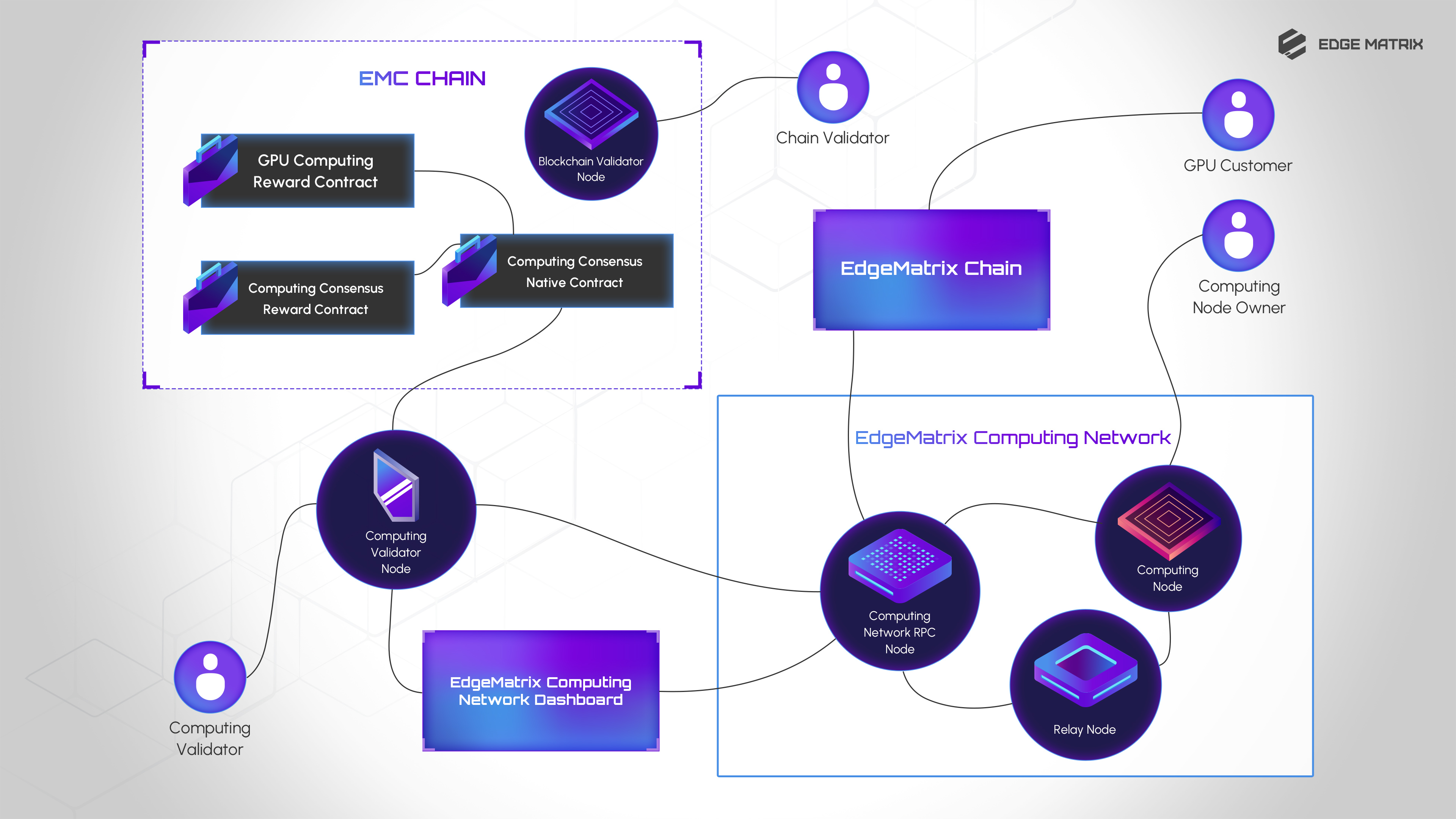
验证节点拥有者需要在主链的算力共识合约进行质押才能获取验证权利，验证节点服务需要通过RPC节点订阅算力调用事件获取实时的算力调用记录或者调用EMC Protocol Computing Network Dashboard 的openAPI获取算力调用记录以及账单记录，通过哈希指纹验签方式对数据有效性进行校验后向主链的算力共识合约提交每笔算力调用或者账单的校验结果，验证合约采用IBFT确认并记录，GPU Computing Reward合约根据验证结果对算力节点提供者（Computing Node Owner）进行奖励发放。当每笔算力共识完成，验证节点的Owner也会通过Computing Consensus Reward合约获取奖励。

## **RPC节点（RPC Nodes）**

需要具有稳定的网络带宽以及更高性能的cpu、更大的内存，提供https的api服务，通过RPC节点可发起算力请求，订阅算力调用事件等。

## **智能路由节点（Computing Network Relay Nodes）**

智能路由节点是EMC网络中的重要组成部分，需要具有稳定的网络带宽以及足够的cpu、内存，每个中继节点要求能够同时接受500+以上的算力节点的长连接，为RPC节点到算力节点的通讯提供稳定的中继服务，算力节点可通过中继的节点接受算力调用请求所以无需开放对外tcp端口也无需固定公网ip地址。它们具有以下功能：

1. 连接所有验证节点和边缘算力节点：智能路由节点连接了EMC网络中的所有验证节点和边缘算力节点，使它们可以相互通信和交互。
2. 完成全网状态机的同步记录：EMC网络中的全网状态机需要被所有验证节点记录和同步，智能路由节点作为一个关键的中转节点，能够将所有的状态机信息进行同步，确保全网的状态机信息一致性。
3. 根据最短路径及算力节点负载能力将请求送达边缘算力节点并返回结果：智能路由节点能够根据最短路径和算力节点的负载能力将请求路由到最佳的边缘算力节点，并将结果返回给请求方。这能够提高EMC组网的性能和稳定性。
4. 实时通讯广播：智能路由节点也用于服务全网的实时通讯广播，它们能够将消息广播到整个网络中的所有节点，确保节点之间可以实时通信和交互。

智能路由节点通过提供计算资源和网络带宽来赚取奖励。

## **算力节点（Computing Nodes）**

算力节点是EMC组网中的另一个重要组成部分，它们承担着实际的计算任务，为整个网络提供算力支持。算力节点可以是个人电脑、服务器、智能手机等计算设备，它们运行EMC的服务进程，作为智能路由节点的目标节点，接收来自智能路由节点的计算请求并完成相应的计算任务，将结果返回给智能路由节点，从而提高EMC组网的计算效率和性能。\
算力节点获得奖励分为算力证明和算力任务两种。算力证明通过加入算力节点经过状态位验证获得，而算力任务则是通过完成AI Agent的算力任务获得。

## **算力池（Computing Pool）**

为了服务大型计算任务，算力池是由多个算力节点组成的一种方式，不同节点之间可以通过共享资源和任务调度等方式协同工作，从而提高整个池的计算效率和性能。通常，这些算力节点配置有高性能GPU（图形处理器），具备的计算能力可以用于执行各种计算密集型任务，包括AI模型训练和AI应用推理等。在算力池中，节点可以共享资源，例如共享GPU、内存等，以提高整个池的计算效率和性能。同时，算力池也提供许多AI框架（如TensorFlow、PyTorch等），为用户提供更方便、更灵活、更经济的计算服务。相比于单个算力节点，算力池具有更大的计算能力和更高的可靠性，能够满足更大规模的计算任务需求。<br>

## **验证共识（Validator Consensus）**

EMC全网共有3F+1个验证节点，所有验证节点通过IBFT（伊斯坦布尔拜占庭容错）策略达到2/3确认后，实现验证节点之间的共识。这种共识算法具有公平、高效、低能耗、低交易成本等优点，使得EMC网络在快速应用交互和低成本交易方面具有很大的优势。<br>

## **节点质押（Staking）**

验证节点的存在是为了保证网络的算力调度以及算力奖励结算的有效性。验证节点需要拥有一定的EMC代币作为抵押品，以确保它们不会故意作恶，否则它们的抵押品将被罚没。验证节点的奖励收益与其抵押的代币数量成正比，这意味着抵押更多代币的验证节点拥有更大的收益，能够更容易地成为区块链的共识者，因此他们有动力保持诚实并为整个网络做出贡献。智能路由节点是指负责路由计算请求和调度计算任务的节点，节点的数量直接影响着整个算力网络的性能和稳定性。如果智能路由节点数量不足或者分布不均，将会导致网络的拥堵和延迟。智能路由节点需要拥有一定的EMC代币作为抵押品，并合理规划和配置智能路由节点的数量和分布。一旦节点被选中并且能够顺利完成任务，它们就能够获得相应的奖励。对于算力节点来说，通过质押一定数量的EMC来证明其在网络中的身份和参与意愿。算力节点在网络中完成的AI Agent任务和所获得的奖励与其持有的权益数量有关。算力节点可以选择不质押并承担一些非连续性任务来获得收益，这样可以更灵活地利用它们的算力资源。例如实时通讯，AIGC应用等，那么这些任务一般不需要长时间占用算力节点的资源，可以很好地和其他计算任务共存，对于EMC组网而言，这些非连续性任务可以进一步提高网络的计算效率和性能，同时给小算力机器提供了更多的收益途径，促进了EMC生态的发展。<br>

## **算力插座（Socket）**

算力插座是一种将AI算力资源转化为代币化资产的技术，每个AI Agent都可以通过算力插座进行代币资产化发行。终端用户可以通过购买这些代币来获得相应的算力资源，同时可以交易代币，算力和应用程序的代币资产化，可以为AI生态提高资源的流动性。

> 最后引用来自[比特币官方网站](https://bitcoin.org/en/)的一句话，“EMC是开源的，其设计是公开的，没有人拥有或控制EMC，每个人都可以参与其中。”


# 工作方式及拓扑图

<figure><img src="https://1412687580-files.gitbook.io/~/files/v0/b/gitbook-x-prod.appspot.com/o/spaces%2FAV1WE0GjBZ37BF6lF45G%2Fuploads%2FiG9k0Rlno4iE1omb9FZ4%2Fimage.png?alt=media&amp;token=d289dbab-f100-4f7a-a92c-842f19f531de" alt=""><figcaption></figcaption></figure>

在EMC protocol中，记账的实现方式是验证节点通过使用智能合约将状态机提交到主链上进行验证和确认。具体来说，EMC protocol将状态机打包成一种称为“承诺”的数据结构，并将其存储在智能合约中。这个过程被称为“提交”。一旦承诺被提交到智能合约中，交易将被视为已经完成。这个过程被称为“确认”。需要注意的是，在EMC protocol中，提交和确认的过程是异步的。也就是说，交易状态的提交和确认可能需要一些时间。但是，一旦交易被提交，用户就可以放心地相信它们已经完成，并且不需要等待确认就可以进行下一步操作。


# DeepSeek API

DeepSeek API 使用与 OpenAI 兼容的 API 格式。通过修改配置，您可以使用 OpenAI SDK 或者兼容 OpenAI API 的软件来访问 DeepSeek API。

| PARAM    | VALUE                |
| -------- | -------------------- |
| api\_url | 从 emchub 获取 api\_url |
| api\_key | 从 emchub 获取 api\_key |

***

**调用 Chat API**

一旦您获得了 API key，就可以使用以下示例脚本来访问 DeepSeek API。以下示例是非流式的，如果需要流式响应，可以将 `stream` 参数设置为 `true`。

* **curl 示例**:

```bash

curl <api_url> \
 -H "Content-Type: application/json" \
 -H "Authorization: Bearer <api_key>" \
 -d '{
       "model": "emchubSDK-chat",
       "messages": [
         {"role": "system", "content": "You are a helpful assistant."},
         {"role": "user", "content": "Hello!"}
       ],
       "stream": false
     }'

```


# EMC DAO

**EMC** 通过 **DAO（去中心化自治组织）** 的治理架构，为社区带来真正的民主化决策和持续性发展动力。依托公链的透明性与自动化合约的可执行性，让更多持币者、开发者、硬件提供商及普通用户共同参与平台决策，构建一个**健康、透明、民主**的**AI + 硬件**生态。\
**EMC DAO** 通过**分层治理架构**、**公开透明的提案投票机制**与**社区基金**的合理运作，实现去中心化自治的关键目标：

* **人人可参与**：任何持币者、硬件提供方、AI 开发者都能在一定门槛下提交提案、投票或委托投票；
* **可持续演进**：核心智能合约、参数调整与生态基金支出都在公共讨论与投票后执行，保证决策公开且可追溯；
* **多方共赢**：通过社区基金和激励机制，为新项目孵化、硬件节点发展及用户活动提供资金支持，持续壮大 EMC 生态。

这种模式，让 EMC 不止是一条公链或一个项目，更是一个由全球社区共同塑造、共同治理、共同受益的**新型 AI + 硬件融合生态系统**。


# DAO 架构：去中心化治理原则与流程

## **核心理念**

* **平等共治**：任何达到一定门槛的 EMC 代币持有者或硬件贡献者，都有权提交提案并参与投票；
* **公开透明**：所有提案、投票过程及结果均记录在链上，通过 DAO 合约自动执行，无需人为干预；
* **自我迭代**：EMC DAO 可随着社区共识与技术演进，不断升级治理框架，保持适应性与开放性。

## **组织层次**

* **基础社区层（Base Community）**：普通持币者、硬件节点、AI 开发者等，通过质押或持有 EMC 获取投票权；
* **高级审议层（Council/Delegates）**（可选）：由高信誉节点或大额持币者组成，对重大提案进行前置评估，保障提案质量；
* **执行层（Execution Layer）**：多签或智能合约自动执行投票结果，避免中心化管理风险。

## **流程示例**

1. **提案提交**：发起人撰写提案，阐明目标、资金需求、执行方案；
2. **社区讨论**：在官方论坛或治理平台展开公开讨论，收集反馈与修正；
3. **投票表决**：进入正式投票环节，满足通过率即进入执行阶段；
4. **智能合约执行**：投票通过后，多签或治理合约自动执行提案内容；
5. **效果评估**：社区跟踪提案执行情况，为后续决策提供参考。


# 提案与投票机制：代币持有者如何参与决策

1. **提案门槛**
   * **持币要求**：例如持有 ≥10,000 EMC 或占一定总量，使提案更具严肃性；
   * **贡献要求**（可选）：硬件节点或 AI 开发者有特殊贡献值，也可获得提案权，确保技术群体声音。
2. **投票模式**
   * **1 EMC = 1 Vote**：最常用且直观的方式；
   * **质押加权**：锁仓或质押时长越久、投票权重越高，强化长期治理参与；
   * **代理投票**：允许小散用户委托给专业节点或社区领袖投票，提升决策效率与专业度。
3. **投票结果与时间锁**
   * **简单多数**：一般提案只需 50%+ 赞成便通过；
   * **超级多数**：重大提案需要 60-70% 投票通过；
   * **延迟执行**：重大提案通过后可能有 48-72 小时时间锁，给社区充分反应空间。


# 社区基金运作：资源分配与社区激励规则

**社区基金**（或 Treasury）为 EMC DAO 的财务，用于支持**生态建设**、**项目孵化**与**开发者激励**。其安全与公正运作，是 DAO 成员长期信任的重要基础。

1. **资金来源**
   * **交易手续费**：如内盘、外盘交易中的部分手续费注入；
   * **挖矿分成**：PoA 节点或交易挖矿收益抽成；
   * **官方或合作方注资**：团队或外部合作伙伴定期注入资金，支持社区成长。
2. **使用场景**
   * **项目孵化**：对 AI Agent、硬件节点或第三方 dApp 进行早期投资或技术补贴；
   * **社区活动**：黑客松、Meetup、开发者培训、营销推广等；
   * **安全审计与赏金**：智能合约审计、漏洞赏金，提高平台安全可靠度；
   * **技术与基础设施**：如区块浏览器升级、节点运维、API 网关优化等。
3. **支出流程**
   1. **提案提交**：包含资金使用明细、目标产出、执行人/团队等；
   2. **投票通过**：社区成员（或高级审议层）讨论后表决，达到规定票数方能生效；
   3. **执行监管**：多签/智能合约释放资金，社区对执行过程进行追踪；
   4. **验收评估**：若项目交付成果优异，可提议追加拨款或后续合作。

\
**EMC DAO** 倚靠**去中心化治理架构**与**智能合约**的透明执行，带给社区“**安全、自治、可持续**”的创新氛围：

* **用户与持币者**：享有真正的决策权与收益分享，形成强烈的社区归属感；
* **开发者与硬件提供商**：能通过基金支持与投票机制获得资源、流量与资金，激励更多项目落地；
* **生态整体**：在公开与民主的框架下，不断吸纳新想法与改进策略，保持活力与竞争力。

正是由于这样的“**共建共享**”精神，EMC 才能在区块链与 AI 硬件融合的赛道上**持续迭代**、**稳健扩张**，打造一个真正全球协同的去中心化智能生态。


# 代币经济模型

总数：1,000,000,000&#x20;

$EMC将作为ERC-20在**Edge Matrix Chain推出，并且通过跨链桥（**[**bridge.emc.network**](https://bridge.emc.network)**)支持**Arbitrum One和Base公链。

$EMC合约地址：

[0x20Dcf8106bdC2cCCcf84DD62dc486A7123A41d13](https://emcscan.com/address/0x20Dcf8106bdC2cCCcf84DD62dc486A7123A41d13) （**Edge Matrix Chain**）[0xDFB8BE6F8c87f74295A87de951974362CedCFA30](https://arbiscan.io/token/0xDFB8BE6F8c87f74295A87de951974362CedCFA30) （Arbitrum One）

接收$EMC需要准备支持ERC-20协议的钱包地址，在钱包中添加**Edge Matrix Chain**链，并根据代币合约地址添加Token。


# 代币分配

* Founding Developer Team: 15%
* EMC Foundation: 10%
* VC Investors: 10%
* Public Sale: 10%
* Ecosystem Reward: 55%
  * Infra Computing 30%（用于基础算力网络的算力奖励，用于奖励接入网络的GPU算力节点）
  * AI Adoption 25%（用于AI应用层的奖励，包含AI电子消费品与AI Agent代币化资产的交易）

<figure><img src="https://1412687580-files.gitbook.io/~/files/v0/b/gitbook-x-prod.appspot.com/o/spaces%2FAV1WE0GjBZ37BF6lF45G%2Fuploads%2Fv9908Bmox6X5uvTRNKWq%2Fimage.png?alt=media&amp;token=f880aa69-4428-4a9d-9d21-9a0c6734c1ba" alt=""><figcaption></figcaption></figure>


# 代币用途

**EMC** 代币在项目生态中承担以下主要功能：

## **支付（Payment）**

* **Gas 费用**：所有在 EMC 公链上的交易与智能合约操作均需消耗 EMC 作为 Gas；
* **服务费**：AI Agent 服务调用、硬件资源租用、数据查询等场景，也可通过 EMC 结算。

## **治理（Governance）**

* **DAO 投票权**：持有 EMC 的用户可参与项目重大决策投票（如协议升级、资金使用、项目激励规则更改等）；
* **提案发起**：部分高持仓或质押用户可直接提交改进提案，影响生态未来发展。

## **质押（Staking）**

* **PoS / 验证节点质押**：EMC 公链采用的 PoS/权益证明方式，需要节点或用户质押 EMC 以获得区块打包和挖矿奖励；
* **收益分成**：质押者根据节点的出块情况或锁仓周期获取相应分红，提升 EMC 持有者的黏性。

## **销毁机制（Burning）**

* **交易销毁**：用户通过EMC Hub购买网络算力所支付的全部EMC自动销毁；
* **通缩激励**：在保持网络稳定的前提下，持续减少代币的流通量，提高代币稀缺性与价值支撑。


# 产品收入模式

除去代币本身的价值成长与交易手续费，EMC 还从以下维度形成可持续的**产品收入**：

1. **硬件广告收入**
   * **广告植入**：在用户硬件设备（如 AI眼镜、智能音箱）或平台界面中嵌入定制化广告；
   * **精准投放**：结合 AI Agent 分析能力，为特定用户推送更精准的硬件/软件营销信息，平台可收取广告投放费。
2. **硬件销售收入**
   * **自研硬件**：若 EMC 官方或生态合作方推出 AI 硬件（GPU 服务器、家用挖矿设备、IoT 节点等），其销售差额或利润将归入平台或对应合作伙伴；
   * **硬件增值服务**：如维护、升级、数据订阅等服务费，以 EMC 或法币形式支付。
3. **Gas 费**
   * **交易与合约操作**：所有在 EMC 公链上发生的交易，均需支付 EMC 作为 Gas ；
   * **收入归节点**：产生的 Gas 费60%分配给节点或矿工，40%可进入平台基金（如 DAO 奖励池）。

\
**EMC 代币**与**经济模型**共同打造了一个既可实现**软硬一体化**（AI + 硬件）的技术生态，又能通过**代币分配**与**多元化收入模式**来保证持续激励与项目健康运转；

随着**硬件广告、硬件销售、Gas费、协议费**等产品收入的增长，EMC 生态将拥有更加稳固的经济基础，为更多**AI Agent**与**硬件提供者**提供机会，同时也让普通用户与社区成员获得真实且持续的参与收益。


# 未来规划与发展

在当前 **AI + Web3 + 硬件** 的融合浪潮中，**EMC** 一直秉持“**让智能更好地落地现实、让现实资产更好地拥抱智能**”的理念。面向未来，我们将围绕以下重点方向持续深耕，让 **EMC** 真正成为“**人人可参与、万物可上链**”的下一代基础设施。<br>

## **RWA 平台**

* **真实世界资产（RWA）代币化**：支持如房地产、艺术品、金融资产等传统领域的资产通过代币化形式上链，扩大区块链技术的应用边界。
* **高流动性支持**：为 RWA 提供一个高效的去中心化交易市场，降低资产管理和交易成本。
* **合规性保障**：结合链上智能合约和链下法律框架，确保代币化资产的合法性和可追溯性。

<br>

## **打造 AI + RWA + DeFi 的全新生态**

EMC 将以 Web3 技术为核心，连接 AI、硬件和现实世界资产，构建具有全球影响力的智能体经济生态。

**AI 智能体的 DeFi 化**

* 实现智能体的自主资产管理，赋予其借贷、投资和收益分配能力。
* 为智能体提供去中心化金融支持，推动其完成更复杂的任务。

**链上资产的现实应用**

* 扩展代币化资产的实际应用场景，包括智能交通、供应链优化和能源管理等。
* 实现 AI 技术与现实场景的全面结合，助力传统行业的数字化转型。

**技术合作与行业标准化**

* 联合其他区块链生态，共同制定智能资产的行业标准。
* 推动跨链协作与资源共享，打造全球化的区块链智能生态。

## **生态扩展目标**

EMC 的生态扩展计划旨在通过用户增长、技术优化和社区建设实现可持续发展：

* **节点增长**：未来 3 年内目标增长至 3000+ 验证节点，支持全球范围内的去中心化算力网络。
* **活跃用户规模**：在 2025 年达到 50 万活跃用户，并通过不断创新的用户激励计划推动长期用户留存。
* **代币市值预期**：通过代币的多场景应用与价值捕获，目标在 5 年内实现市值的稳定增长，成为去中心化 AI 领域的标杆。


# 常见问题 （FAQ)

**EMC 是什么？与其他区块链平台有何不同？**

{% hint style="success" %}
EMC（Edge Matrix Chain）是一条支持 AI 硬件与软件资产代币化的 Layer-1 公链，专注于去中心化智能生态建设。不同于传统区块链平台，EMC 提供软硬件深度结合的能力，将 AI Agent 和硬件设备连接在一起，支持算力共享、资产代币化以及智能生态的全球流通。<br>
{% endhint %}

**如何参与 EMC 生态？**

{% hint style="success" %}
您可以通过以下方式参与 EMC 生态：

1. **普通用户**：购买和质押 EMC 代币，参与交易挖矿、邀请挖矿或算力共享。
2. **开发者**：通过 EMC Hub 平台发布 AI软件让用户使用。
3. **硬件提供商**：将 GPU、IoT 设备或机器人等硬件设备接入 EMC 网络，参与硬件挖矿。
4. **投资者**：参与资产代币的认购或二级市场交易。
   {% endhint %}

**EMC 平台与传统中心化 AI 云服务的区别是什么？**&#x20;

{% hint style="success" %}
EMC 通过去中心化方式整合全球闲置硬件与 AI 开发者资源，使用通证激励机制鼓励多方主动参与。相比传统中心化云服务，EMC 的模式更加开放、成本可控，且用户可共同受益于平台成长。
{% endhint %}

**EMC 代币价值支撑在哪里？**

{% hint style="success" %}
EMC 既是平台 Gas，也作为主要交易对和挖矿奖励，能在多种场景（AI Agent 服务费、硬件租用、投票治理等）中被使用或销毁。随着更多硬件与 AI 项目接入，EMC 的需求与价值也将同步提升。
{% endhint %}

**安全性如何保障？**&#x20;

{% hint style="success" %}
平台核心合约均经过专业审计，并设有黑名单、防刷单、AI 风控等策略。另外，社区也有举报与监督机制，进一步提升整体安全与透明度。
{% endhint %}


# 什么是 EMC 和 POC？

### EMC网络

EMC是一个专为AI应用服务的区块链计算力网络。与传统区块链不同，EMC采用计算力共识来完成“AI任务”。&#x20;

EMC网络由<mark style="color:orange;">验证节点、智能路由节点和算力节点</mark>组成。更多信息请参阅[白皮书](https://docs.emc.network/whitepaper-cn/)。

<figure><img src="https://1412687580-files.gitbook.io/~/files/v0/b/gitbook-x-prod.appspot.com/o/spaces%2FAV1WE0GjBZ37BF6lF45G%2Fuploads%2Fc27W6T7LjfPHxseCfrAa%2Fimage.png?alt=media&amp;token=12e68efc-3fd9-443e-97aa-2ee886215612" alt=""><figcaption></figcaption></figure>

### POC（算力证明）

目前，EMC 网络采用 Stable Diffusion 算法作为图像生成的共识机制，作为全网的共识方法。&#x20;

当计算力节点从验证节点接收到一个随机的AI图像生成任务时，它需要在指定的时间内使用本地的 CPU/GPU 进行计算。具有相同任务的算力节点将进行图像的 MD5 交叉验证，那些一致性超过50%的节点将被识别为有效的计算节点（基于性能统计，称为“E-power”）。这种方法具有以下几个优点：

1. 稳定性：Stable Diffusion 算法确保了高水平的稳定性，保障网络的安全性和可靠性。通过这种共识机制，节点可以达成一致，确保所有交易和数据的准确性和一致性。&#x20;
2. 可扩展性：Stable Diffusion 算法支持高度可扩展性，允许在网络中增加更多的节点和参与者，而不会对性能和效率产生重大影响。这有助于网络处理日益增长的用户和交易量。&#x20;
3. 公平性：稳定扩散算法使用图像共识，确保节点的公平和平衡的选举和权益分配，防止集中化和垄断，鼓励更多的节点参与和贡献。&#x20;
4. 通过采用稳定扩散算法进行图像生成共识，EMC计算力网络为未来的AI现实应用提供了坚实的基础。它将支持多样化的AI模型训练、推理和应用开发，涵盖各种主题，如人物、场景、动物等，为AI开发者和用户提供丰富的选择。


# 如何加入 EMC 并获取奖励？

### 1. 加入网络

算力节点（本篇后续内容的节点，均指算力节点）需要加入EMC算力网络，并成为网络的一部分。该节点可以与网络中的其他节点连接并进行通信。

### 2. 从验证节点接收任务

EMC算力网络由负责分发AI绘图任务的验证节点管理。一旦算力节点加入网络，它会等待由验证节点发送的随机AI绘图任务。

### 3. 计算任务

在从验证节点接收到 AI 绘图任务后，算力节点开始使用其本地 CPU/GPU 进行计算。节点在规定的时间内生成所需的AI绘图。

### 4. 图像验证

完成AI绘图后，算力节点将生成的图像转换为 MD5 并将其发送给其他节点进行交叉验证。

### 5. 达成共识

其他算力节点也对相同任务进行类似的计算并生成相应的图像。所有参与节点对彼此的图像进行交叉验证，并根据多数同意（50%或更多）达成共识，以确定有效的算力节点。

### 6. 获取奖励

一旦算力节点被确认为有效节点并与其他节点达成共识，它将获得相应的奖励。奖励（EMC代币）将在隔日的 UTC 00:00 分配给整个网络。

### 7. 算力市场

算力节点可以继续参与网络内的市场，接收更多任务并获得额外的奖励。节点可以根据其计算能力和贡献程度参与更多基于AI的应用。

<figure><img src="https://1412687580-files.gitbook.io/~/files/v0/b/gitbook-x-prod.appspot.com/o/spaces%2FAV1WE0GjBZ37BF6lF45G%2Fuploads%2FyiYOYbrRiaolFTNugJt4%2Fb0b692e1aaba88040e23b5f7e02fb62.png?alt=media&amp;token=e0ab511b-6f83-4266-8ddb-9ae277e59b64" alt=""><figcaption></figcaption></figure>


# EMC节点部署

## 要求

EMC 测试网络目前优先考虑来自 EPN（EdgeMatrix 合作伙伴网络）合作伙伴的 GPU 提供商。

如果您代表 IDC 或计算中心，请考虑加入 EPN 计划，\
如果您是能够为 AI 应用和客户提供稳定计算能力的个人节点运营商，**请在进行部署/质押代币到节点前先与我们联系以加入测试网络的白名单。请联系** [**Discord**](https://discord.gg/bAPhdTcEXw) **上的管理员以获取更多详细信息。**

## 系统要求

&#x20;   操作系统：Ubuntu 22.04

&#x20;   显卡驱动 535版本、显存>=12G

## 一、安装Docker、Nvidia Virtualization

```
# 1.安装依赖
sudo apt-get update
sudo apt-get install ca-certificates curl gnupg
sudo install -m 0755 -d /etc/apt/keyrings
curl -fsSL https://download.docker.com/linux/ubuntu/gpg | sudo gpg --dearmor -o /etc/apt/keyrings/docker.gpg
sudo chmod a+r /etc/apt/keyrings/docker.gpg
# 2.配置软件源
echo \
  "deb [arch=$(dpkg --print-architecture) signed-by=/etc/apt/keyrings/docker.gpg] https://download.docker.com/linux/ubuntu \
  $(. /etc/os-release && echo "$VERSION_CODENAME") stable" | \
  sudo tee /etc/apt/sources.list.d/docker.list > /dev/null
# 3.安装Docker
sudo apt update
sudo apt-get install docker-ce docker-ce-cli containerd.io docker-buildx-plugin docker-compose-plugin
# 4.安装NVIDIA GPU Docker Virtualization
distribution=$(. /etc/os-release;echo $ID$VERSION_ID) \
      && curl -fsSL https://nvidia.github.io/libnvidia-container/gpgkey | sudo gpg --dearmor -o /usr/share/keyrings/nvidia-container-toolkit-keyring.gpg \
      && curl -s -L https://nvidia.github.io/libnvidia-container/$distribution/libnvidia-container.list | \
            sed 's#deb https://#deb [signed-by=/usr/share/keyrings/nvidia-container-toolkit-keyring.gpg] https://#g' | \
            sudo tee /etc/apt/sources.list.d/nvidia-container-toolkit.list
sudo apt-get update
sudo apt-get install -y nvidia-container-toolkit
sudo systemctl restart docker
sudo nvidia-ctk runtime configure --runtime=docker
sudo systemctl restart docker
# 5.验证部署
sudo docker run --rm --gpus=all nvidia/cuda:11.8.0-base-ubuntu22.04 nvidia-smi
```

## 二、部署EMC及EMC Cloud云控

```bash
# Linux
curl -s https://install.edgematrix.pro/setup_linux.sh |sh #初始化EMC
curl -s https://install.edgematrix.pro/setup_cloud_linux.sh |sh #初始化EMC CLOUD
# 启动节点
cd emc
./start.sh
# 启动EMC CLOUD
cd ../cloud
./cloud_client.sh

```

## 三、注册节点奖励钱包

```
# 其中的xxxxxx替换为你的Arb链钱包地址
./edge-matrix node register --commit set --node computing --owner xxxxxx
```

## 四、节点绑定钱包及质押

完成注册后，需要对节点进行绑定钱包，并进行质押EMC操作才能正常获取任务奖励。

**请在质押前先到** [**Discord**](https://discord.gg/3WhxEBPcac) **与官方人员确定节点白名单相关细节**

绑定及质押地址：<https://dashboard.edgematrix.pro/#/nodes/xxxxxx>

注意：请将质押地址中的xxxxxx替换为你自己的Node ID。（在启动EMC CLOUD时会有输出Node ID，以及第五节中辅助脚本也能查看到）

### 五、辅助验证及查看脚本

<pre><code><strong># 查询版本
</strong><strong>./edge-matrix version
</strong># 查询节点ID
./edge-matrix secrets output --data-dir edge_data
# 查询节点状态
./edge-matrix node status
</code></pre>

验证节点和路由节点需要质押 EMC token，因此大部分普通用户主要登记为算力节点，如需登记为验证节点或路由节点，请联系我们。

## 重装

如果需要重新安装，那么请先备份好emc/edge\_data目录。它可以确保依然使用原始nodeID和钱包地址。

```
# 1.杀掉emc的进程
sudo pkill edge-matrix 
sudo pkill nomad
# 2.备份emc/edge_data目录
cd emc
sudo cp -r edge_data ../
# 3.删除emc和cloud文件夹, 删除emc_cloud_linux_64.tgz和emc_linux_64.tgz文件
cd ..
sudo rm -rf emc cloud emc_cloud_linux_64.tgz emc_linux_64.tgz
# 3.再重新安装一遍EMC节点
# 4.当安装完成后再把edge_data目录还原回来覆盖
sudo cp -rf edge_data emc/
```

如果您有任何问题，您可以去 [Telegram](https://t.me/emc_network) 或 [Discord](https://discord.gg/Yj6vyv8D48) 留言。


# EMC-Requester

欢迎来到新的 [Edge Matrix Requester](https://57hlm-riaaa-aaaap-qbhfa-cai.icp0.io/#/info) 项目和 internet computer 开发社区。默认情况下，创建新项目会将此 README 文件和一些模板文件添加到项目目录中。您可以编辑这些模板文件，以定制您的项目并加入您自己的代码，以加快开发周期。

开始之前，您可能希望探索项目的目录结构和默认配置文件。在您的开发环境中使用此项目不会影响任何生产部署或身份令牌。

在开始使用Edge Matrix Requester之前，您可以查阅在线提供的以下文档来了解更多信息：

* [Quick Start](https://internetcomputer.org/docs/current/developer-docs/quickstart/hello10mins)
* [SDK Developer Tools](https://internetcomputer.org/docs/current/developer-docs/build/install-upgrade-remove)
* [Motoko Programming Language Guide](https://internetcomputer.org/docs/current/developer-docs/build/cdks/motoko-dfinity/motoko/)
* [Motoko Language Quick Reference](https://internetcomputer.org/docs/current/references/motoko-ref/)
* [JavaScript API Reference](https://erxue-5aaaa-aaaab-qaagq-cai.raw.icp0.io/)

如果您想立即开始进行项目开发，您可能想尝试以下命令：

```
cd Edge Matrix Requester/
dfx help
dfx canister --help
```

###

### 运行项目本地测试&#x20;

如果您想在本地测试项目，可以使用以下命令：

```
# Starts the replica, running in the background
dfx start --background

# Deploys your canisters to the replica and generates your candid interface
dfx deploy
```

完成工作后，您的应用程序将在以下地址可用：

`http://localhost:4943?canisterId={asset_canister_id}`&#x20;

如果您对后端 canister 进行了更改，您可以随时使用以下命令生成新的 candid 接口：&#x20;

```
npm run generate 
```

这在启动前端开发服务器之前是推荐的，并且会在您运行 `dfx deploy` 时自动运行。&#x20;

如果您正在进行前端更改，可以使用以下命令启动开发服务器：&#x20;

```
npm start
```

这将在 `http://localhost:8080` 启动一个服务器，并将 API 请求代理到端口 4943 上的副本。&#x20;

### 关于前端环境变量的注意事项&#x20;

如果您在不使用 DFX 的情况下托管前端代码，您可能需要进行以下调整，以确保您的项目在生产中不会获取根密钥：&#x20;

* 如果您使用 Webpack，请将 `setDFX_NETWORK` 设置为 `ic`&#x20;
* 使用您自己喜欢的方法替换自动生成的声明中的 `process.env.DFX_NETWORK` 在 `dfx.json` 中将 `canisters -> {asset_canister_id} -> declarations -> env_override` 设置为字符串，将替换自动生成的声明中的 `process.env.DFX_NETWORK` 为该字符串&#x20;
* 编写您自己的 `createActor` 构造函数


# EMC Java SDK

emc\_java\_sdk是一个轻量级的Java库，用于与边缘矩阵网络上的客户端（节点）集成：&#x20;

这使您可以在不必编写自己的集成代码的情况下，与 [EdgeMatrix ](https://www.edgematrix.pro/)分布式算力网络进行交互。&#x20;

### 快速开始&#x20;

使用emc\_java\_sdk开始您的旅程的最简单方法是创建一个项目。&#x20;

请前往 [EdgeMatrix](https://www.edgematrix.pro/) 获取有关使用 emc Java SDK 的进一步说明。&#x20;

### **Maven**&#x20;

将jar包部署到您的本地maven仓库。

$ mvn install:install-file -Dfile=/local/path/edge-matrix-sdk-java-1.1-SNAPSHOT.jar -DgroupId=pro.edge-matrix -DartifactId=edge-matrix-sdk-java -Dversion=1.1-SNAPSHOT -Dpackaging=jar

```
<dependency>
    <groupId>pro.edge-matrix</groupId>
    <artifactId>edge-matrix-sdk-java</artifactId>
    <version>1.1-SNAPSHOT</version>
    <scope>provided</scope>
</dependency>
```

```
<dependency>
    <groupId>org.junit.jupiter</groupId>
    <artifactId>junit-jupiter</artifactId>
    <version>5.5.2</version>
    <scope>test</scope>
</dependency>
```

```
<dependency>
    <groupId>org.web3j</groupId>
    <artifactId>core</artifactId>
    <version>4.9.7</version>
</dependency>
```

### Sample code

```
public class YourEdgeCaller {
    private static EdgeWeb3j web3j = EdgeWeb3j.build(new HttpService("https://oregon.edgematrix.xyz"));

    // A edge-matrix node that is running Stable Diffusion service for testing purpose.
    private static String TEST_PEERID = "16Uiu2HAm14xAsnJHDqnQNQ2Qqo1SapdRk9j8mBKY6mghVDP9B9u5";

    public void sendRtcMessage() {
        EdgeService edgeService = new EdgeService();
        String s = edgeService.sendRtcMsg(
                web3j,
                ChainId.TEST_NET.getId(),
                SampleKeys.CREDENTIALS,
                RtcMsg.createRtcMsg(
                        "0x8eeb338239ada22d81ffb7adc995fe31a4d1dc2d701bc8a58fffe5b53e14281e",
                        "edge_chat",
                        "hello",
                        new Address("0x0").toString()));
        System.out.println(s);
    }

    public void callStableDeffusionEdgeApi() {
        EdgeService edgeService = new EdgeService();
        String peerId = TEST_PEERID;
        String apiHttpMethod = "POST";
        String apiPath = "/sdapi/v1/txt2img";
        String apiData = "{\n" +
                "      \"enable_hr\": false,\n" +
                "      \"denoising_strength\": 0,\n" +
                "      \"firstphase_width\": 0,\n" +
                "      \"firstphase_height\": 0,\n" +
                "      \"hr_scale\": 2,\n" +
                "      \"hr_upscaler\": \"\",\n" +
                "      \"hr_second_pass_steps\": 0,\n" +
                "      \"hr_resize_x\": 0,\n" +
                "      \"hr_resize_y\": 0,\n" +
                "      \"prompt\": \"white cat and dog\",\n" +
                "      \"styles\": [\n" +
                "        \"\"\n" +
                "      ],\n" +
                "      \"seed\": -1,\n" +
                "      \"subseed\": -1,\n" +
                "      \"subseed_strength\": 0,\n" +
                "      \"seed_resize_from_h\": -1,\n" +
                "      \"seed_resize_from_w\": -1,\n" +
                "      \"sampler_name\": \"\",\n" +
                "      \"batch_size\": 1,\n" +
                "      \"n_iter\": 1,\n" +
                "      \"steps\": 50,\n" +
                "      \"cfg_scale\": 7,\n" +
                "      \"width\": 512,\n" +
                "      \"height\": 512,\n" +
                "      \"restore_faces\": false,\n" +
                "      \"tiling\": false,\n" +
                "      \"do_not_save_samples\": false,\n" +
                "      \"do_not_save_grid\": false,\n" +
                "      \"negative_prompt\": \"\",\n" +
                "      \"eta\": 0,\n" +
                "      \"s_churn\": 0,\n" +
                "      \"s_tmax\": 0,\n" +
                "      \"s_tmin\": 0,\n" +
                "      \"s_noise\": 1,\n" +
                "      \"override_settings\": {},\n" +
                "      \"override_settings_restore_afterwards\": true,\n" +
                "      \"script_args\": [],\n" +
                "      \"sampler_index\": \"Euler\",\n" +
                "      \"script_name\": \"\",\n" +
                "      \"send_images\": true,\n" +
                "      \"save_images\": false,\n" +
                "      \"alwayson_scripts\": {}\n" +
                "    }";
        String s = edgeService.callEdgeApi(
                web3j,
                ChainId.TEST_NET.getId(),
                edgeService.getNextTelegramNonce(web3j, SampleKeys.ADDRESS),
                SampleKeys.CREDENTIALS,
                peerId,
                apiHttpMethod,
                apiPath,
                apiData);
        if (isValidJSON(s)) {
            ObjectMapper objectMapper = new ObjectMapper();
            EdgeCallResult edgeCallResult = objectMapper.readValue(s, EdgeCallResult.class);
            System.out.println("telegram_hash: " + edgeCallResult.getTelegram_hash());
            System.out.println("response: " + new String(Base64.getDecoder().decode(edgeCallResult.getResponse())));
        } else {
            System.out.println("invalid json");
        }
    }
}
```

### License

Apache 2.0


# EMC Go SDK

### EMC Go 代理

View ./emc-go-agent/agnet\_test.go to get help.

### 基本用法

```
func TestCallEdgeApi_post(t *testing.T) {
	privateKey, err := crypto.BytesToECDSAPrivateKey([]byte("03b7dfc824b0cbcfe789ec0ce4571f3460befd0490e3d0d2aad8e3c07dbcce14"))
	if err != nil {
		t.Fatalf("unable to extract private key, %v", err)
	}

	a, _ := NewDefaultAgent(
		hclog.NewNullLogger(),
		privateKey,
		rpc.NewClientWithRpcUrl(rpc.TESTNET_ID, "https://oregon.edgematrix.xyz"))

	// Sample for stable diffusion
	// Api path: /sdapi/v1/txt2img
	prompt := "white cat and dog"
	data := `{"enable_hr":false,"denoising_strength":0,"firstphase_width":0,"firstphase_height":0,"hr_scale":2,"hr_upscaler":"","hr_second_pass_steps":0,"hr_resize_x":0,"hr_resize_y":0,"prompt":"%s","styles":[""],"seed":-1,"subseed":-1,"subseed_strength":0,"seed_resize_from_h":-1,"seed_resize_from_w":-1,"sampler_name":"","batch_size":1,"n_iter":1,"steps":50,"cfg_scale":7,"width":512,"height":512,"restore_faces":false,"tiling":false,"do_not_save_samples":false,"do_not_save_grid":false,"negative_prompt":"","eta":0,"s_churn":0,"s_tmax":0,"s_tmin":0,"s_noise":1,"override_settings":{},"override_settings_restore_afterwards":true,"script_args":[],"sampler_index":"Euler","script_name":"","send_images":true,"save_images":false,"alwayson_scripts":{}}`
	info, err := a.CallEdgeApi(
		"16Uiu2HAm14xAsnJHDqnQNQ2Qqo1SapdRk9j8mBKY6mghVDP9B9u5",
		"/sdapi/v1/txt2img",
		fmt.Sprintf(data, prompt),
		METHOD_POST)
	if err != nil {
		t.Error(err)
	} else {
		t.Log("TelegramHash: ", info.TelegramHash)
		t.Log("Response: ", info.Response)
		t.Log("Err: ", info.Err)
	}
}
```

### 其他语言 SDK

GitHub 仓库: <https://github.com/EMCProtocol-dev/>

### Stable Diffusion AI 样例

Address: <https://6tq33-2iaaa-aaaap-qbhpa-cai.icp0.io/>

GitHub 仓库: <https://github.com/EMCProtocol-dev/EMC-SD>

### 算力节点测试工具

地址: [https://57hlm-riaaa-aaaap-qbhfa-cai.icp0.io](https://57hlm-riaaa-aaaap-qbhfa-cai.icp0.io/)

GitHub 仓库: <https://github.com/EMCProtocol-dev/EMC-Requester>

### 教程

For tutorials, check <https://edgematrix.pro/start>

### License

Apache 2.0


# EMC JS SDK

这是 `ethereumjs-monorepo` 项目说明。

### Packages

| package                                                                                                    | npm                                                               | keywords                                         |
| ---------------------------------------------------------------------------------------------------------- | ----------------------------------------------------------------- | ------------------------------------------------ |
| [@edgematrixjs/util](https://github.com/EMCProtocol-dev/edgematrixjs-monorepo/blob/main/packages/util)     | [npm package](https://www.npmjs.com/package/@edgematrixjs/util)   | `utility` `create private key`                   |
| [@edgematrixjs/tx](https://github.com/EMCProtocol-dev/edgematrixjs-monorepo/blob/main/packages/tx)         | [npm package](https://www.npmjs.com/package/@edgematrixjs/tx)     | `rlp encode` `keccak256 sign`                    |
| [@edgematrixjs/socket](https://github.com/EMCProtocol-dev/edgematrixjs-monorepo/blob/main/packages/socket) | [npm package](https://www.npmjs.com/package/@edgematrixjs/socket) | `websocket`                                      |
| [@edgematrixjs/http](https://github.com/EMCProtocol-dev/edgematrixjs-monorepo/blob/main/packages/http)     | [npm package](https://www.npmjs.com/package/@edgematrixjs/http)   | `http`                                           |
| [@edgematrixjs/rtc](https://github.com/EMCProtocol-dev/edgematrixjs-monorepo/blob/main/packages/rtc)       | [npm package](https://www.npmjs.com/package/@edgematrixjs/rtc)    | `create subject` `scribe subject` `send message` |
| [@edgematrixjs/client](https://github.com/EMCProtocol-dev/edgematrixjs-monorepo/blob/main/packages/client) | [npm package](https://www.npmjs.com/package/@edgematrixjs/client) | `edgematrixjs for browser`                       |

### 基础用例

### CommonJS and ESmodules

```
npm install --save @edgematrixjs/rtc
```

**Create Subject**

```
import { Http } from '@edgematrixjs/http';
import { RTC } from '@edgematrixjs/rtc';
const chatId = 2;
const privateKey = '';
const httpsUrl = 'https://oregon.edgematrix.xyz';
const emHttp = new Http({ baseURL: httpsUrl });
const rtc = new RTC();
const { _result, hash } = await rtc.createSubject(chainId, privateKey, emHttp);
//_result === 0 is success, the 'hash' is subject
```

**Subscribe Subject**

```
import { EmSocket } from '@edgematrixjs/socket';
import { RTC } from '@edgematrixjs/rtc';
//connect method implement follow in test/index.spec.ts
const wssUrl = 'wss://oregon.edgematrix.xyz/edge_ws';
const handleAction = ({ action, event }) => {};
const { _result: _socketResult, emSocket, event } = await connect({ network: wssUrl, callback: handleAction });
if (_socketResult !== 0) {
  throw new Error('socket is error');
}
const rtc = new RTC();
const chatId = 2;
const application = 'edge_chat';
const subject = 'Your Subject';
const content = 'Your Content';
const params = { subject, application, content, chainId };
const { _result } = await rtc.subscribe(params, privateKey, emSocket);
//_result === 0 is success
```

**Send Message**

```
import { Http } from '@edgematrixjs/http';
import { RTC } from '@edgematrixjs/rtc';
const httpsUrl = 'https://oregon.edgematrix.xyz';
const emHttp = new Http({ baseURL: httpsUrl });
const rtc = new RTC();
const params = {
  subject: globalSubject,
  application: 'edge_chat',
  content: JSON.stringify({ data: 'test send message' }),
  //When the "To" parameter is empty, everyone who subscribed to the subject will receive your message
  //to?: {TargetPublicKey},
  chainId,
};
const { _result } = await rtc.sendMessage(params, privateKey, emHttp);
//_result === 0 is success
```

**Browser**

```
<script src="packages/client/dist/bundle.js"></script>
```

```
<script>
  const privateKey = '0xb22be9c19b61adc1d8e89a1dae0346ed274ac9fa239c06286910c29f9fee59d3';
  const subject = '0x8eeb338239ada22d81ffb7adc995fe31a4d1dc2d701bc8a58fffe5b53e14281e';
  const httpsUrl = 'https://oregon.edgematrix.xyz';
  const wssUrl = 'wss://oregon.edgematrix.xyz/edge_ws';

  window.onload = function () {
    const Http = edgematrixjs.Http;
    const RTC = edgematrixjs.RTC;
    const ws = new edgematrixjs.EmSocket({ url: wssUrl });
    //set open listener
    ws.setOpenListener((event) => {
      const rtc = new RTC();
      const subscribe = { subject: subject, application: 'edge_chat', content: 'subject', chainId: 2 };

      rtc.subscribe(subscribe, privateKey, ws).then((resp) => {
        //send message
        const http = new Http({ baseURL: httpsUrl });
        const messageContent = { data: 'hello' };
        const message = {
          subject: subject,
          application: 'edge_chat',
          chainId: 2,
          content: JSON.stringify(messageContent),
        };
        rtc.sendMessage(message, privateKey, http);
      });
    });

    //set message listener
    ws.addMessageListener((event) => {
      const data = JSON.parse(event.data) || {};
      const params = data.params || {};
      const result = params.result || {};
      const from = result.From;
      const type = result.Type;
      let content = { data: '' };
      try {
        content = JSON.parse(result.Content);
      } catch (e) {}
      console.info(`recerved message `, content);
    });
    //connect socket
    ws.connect();
  };
</script>
```


# EMC Stable Diffusion 样例

[该应用程序](https://6tq33-2iaaa-aaaap-qbhpa-cai.icp0.io/#/)基于EMC网络和IC（Internet Computer）canisters，并提供了一个UI工具，用于根据节点信息和配置的IDL.json文件动态生成图像。

### 描述&#x20;

EMC Stable Diffusion示例是一种工具，利用EMC网络节点生成的数据生成图像表示。通过利用节点信息和提供的IDL.json配置文件，该工具使用户可以创建直观呈现数据的视觉吸引力图像。

### 特点&#x20;

* 基于EMC网络节点数据生成图像&#x20;
* 使用提供的IDL.json配置文件&#x20;
* 用户友好的UI与工具进行交互&#x20;
* 轻松可视化和分析来自EMC网络节点的数据

### 安装&#x20;

1. 克隆代码库：`git@github.com:EMCProtocol-dev/EMC-SD.git`&#x20;
2. 安装依赖项：`npm install`

### 使用方法&#x20;

1. 根据您的需求配置IDL.json文件。&#x20;
2. 运行以下命令启动工具：`npm start`&#x20;
3. 在浏览器中通过提供的URL访问工具。&#x20;
4. 通过UI与EMC网络节点数据交互，生成图像。

### 贡献&#x20;

欢迎贡献！请fork该代码库并提交拉取请求，共享您的改进或修复bug。

### License

This project is licensed under the MPL-2.0 License.

### Screenshots

<figure><img src="https://1412687580-files.gitbook.io/~/files/v0/b/gitbook-x-prod.appspot.com/o/spaces%2FAV1WE0GjBZ37BF6lF45G%2Fuploads%2FHFtwNH64IvfR660XlXec%2Fimage.png?alt=media&amp;token=86952cc4-ae13-4f90-98f7-2a4b6b237d43" alt=""><figcaption></figcaption></figure>

<figure><img src="https://1412687580-files.gitbook.io/~/files/v0/b/gitbook-x-prod.appspot.com/o/spaces%2FAV1WE0GjBZ37BF6lF45G%2Fuploads%2F9xJtjF9v2nhIPpKKVaxW%2Fimage.png?alt=media&amp;token=c1462668-0ed8-439b-9c83-61b68acc0f60" alt=""><figcaption></figcaption></figure>

<figure><img src="https://1412687580-files.gitbook.io/~/files/v0/b/gitbook-x-prod.appspot.com/o/spaces%2FAV1WE0GjBZ37BF6lF45G%2Fuploads%2FLse6HygpqX7nyZMCZHt0%2Fimage.png?alt=media&amp;token=5bc1d388-9f75-48e4-ab33-2554cbafea1d" alt=""><figcaption></figcaption></figure>


# Chatbox: AI 聚合器

[Chatbox](https://chatbox.fun/#/splash) 是一个完全运行在EMC网络上的P2P聊天和AI聚合应用。&#x20;

Chatbox是一个社交聊天DApp，在其中您可以将AI机器人引入任何群组，创建所需的应用效果和商业模型。

![](https://1412687580-files.gitbook.io/~/files/v0/b/gitbook-x-prod.appspot.com/o/spaces%2FAV1WE0GjBZ37BF6lF45G%2Fuploads%2Foqm947w9ffUcD3Dhwv57%2Fimage.png?alt=media\&token=bc1f8f75-80b7-430f-b5e2-50a7b2e417fc)


# AI 电商工具（开发中）

Metafun (新加坡) 正在开发基于 EMC 的 AI 工具，用于电子商务。&#x20;

商家可以上传受版权保护的模型以生成产品照片，而顾客可以上传自己的照片进行虚拟试穿。

<figure><img src="https://1412687580-files.gitbook.io/~/files/v0/b/gitbook-x-prod.appspot.com/o/spaces%2FAV1WE0GjBZ37BF6lF45G%2Fuploads%2FGOvicQMoNJIAcXx2HgSz%2Fimage.png?alt=media&amp;token=6a536d4f-4761-4a7c-9836-2ce8a3926cb0" alt=""><figcaption></figcaption></figure>

<figure><img src="https://1412687580-files.gitbook.io/~/files/v0/b/gitbook-x-prod.appspot.com/o/spaces%2FAV1WE0GjBZ37BF6lF45G%2Fuploads%2FhfHFmYRmfEwwkkd9Mdsz%2Fimage.png?alt=media&amp;token=6fa1f8ba-6bc0-4e28-b393-0954a7af687b" alt=""><figcaption></figcaption></figure>

<figure><img src="https://1412687580-files.gitbook.io/~/files/v0/b/gitbook-x-prod.appspot.com/o/spaces%2FAV1WE0GjBZ37BF6lF45G%2Fuploads%2FY2H9TWyezffspvZz3DGB%2Fimage.png?alt=media&amp;token=f4c2524f-9180-4a17-b471-55279a24cca2" alt=""><figcaption></figcaption></figure>


# Overview

<div data-full-width="false"><figure><img src="https://1003733059-files.gitbook.io/~/files/v0/b/gitbook-x-prod.appspot.com/o/spaces%2FCcFTjhPM7zwDNPXWjdyR%2Fuploads%2FIR1KMWab48tTOr0Zmme3%2Fimage.png?alt=media&amp;token=74e8e6a2-73ac-41cd-a531-2ad5758124cd" alt=""><figcaption></figcaption></figure></div>

\
**Edge Matrix Chain (EMC)** is a Layer-1 EVM-compatible blockchain designed specifically for **Decentralized AI (DeAI)**. It establishes a global AI computing infrastructure, an ecosystem hub, and a standardized AI Agent factory tailored to the Web3 era. By providing the foundational technology for the upcoming surge in AI-driven consumer electronics as well as the issuance and trading of AI assets—EMC creates a **comprehensive AI economic closed loop**, enabling developers, hardware manufacturers, investors, and everyday users to participate in the new AI economy.EMC’s mission is to eliminate centralized barriers in AI by integrating a Web3-driven economic model, unlocking worldwide computing resources to fuel the rapid advancement of decentralized AI.

## Market Challenges

1. **GPU Supply-Demand Imbalance**
   * As AI Agents are rapidly adopted for trade execution, predictive analytics, gaming interactions, DeFi risk management, and more, the demand for high-performance GPUs is skyrocketing.
   * Traditional cloud platforms are highly centralized and expensive, making it difficult for smaller teams and individual developers to afford on-demand resources.
2. **Cross-Chain and Privacy Considerations**
   * AI models frequently require interactions with multiple blockchains, oracles, and confidential data. Existing centralized solutions fall short of delivering comprehensive privacy compliance and multi-chain interoperability.
3. **Incubation and Funding Obstacles**
   * Beyond computational power, AI projects need technical guidance, funding, and community support. Merely offering GPUs is insufficient for propelling projects from the “prototype” stage to large-scale adoption.
4. **Fragmentation Between Hardware and Software**
   * Consumer electronics and intelligent software agents are often trapped in isolated R\&D cycles, closed application environments, and rigid supply chains. This fragmentation also extends to investors and hardware manufacturers, who struggle to find diverse and adaptable financing opportunities.

## EMC’s Strategic Response

* **Decentralized GPU Network** Leverages the untapped potential of global GPU resources, significantly reducing operating costs for AI projects.
* **Holistic Project Support** Offers funding, incubation tools, and technical collaboration to comprehensively assist high-potential AI teams in expediting product development and market entry.
* **Cross-Chain Interoperability & Privacy Enhancements** Enables AI Agents to operate efficiently and securely in a multi-chain environment, ensuring robust data privacy and streamlined asset transfers.

## Two Core Pillars of EMC

1. **EMC Public Chain (Edge Matrix Chain)**
   * **EVM-Compatible Layer-1 Blockchain** Provides high throughput and a customizable consensus mechanism capable of meeting the real-time transaction and smart contract execution requirements of AI-centric applications.
   * **Cross-Chain Bridge** Facilitates seamless asset and data interoperability with other EVM-based networks such as Arbitrum One and Base, expanding EMC’s reach across the broader blockchain ecosystem.
2. **EMC Hub (EMC Protocol, Ecosystem Hub & Incubator)**
   * **On-Demand, Cost-Effective AI Inference APIs** Offers ready-to-use AI compute services tailored to various development needs.
   * **Oracle Services** Acquires input data for AI tasks and generates hashed fingerprints for data verification.
   * **“Node Staking + Compute Incentives” Model** Promotes fairness and ensures high-quality computational resources, granting more participants flexible, reliable GPU access.
   * **Comprehensive Developer Support** Provides resource scheduling, funding, technical collaboration, and community-building services for both enterprises and individual developers.
   * **Unified Interface & Resource Platform** Integrates reward pools and project incubation mechanisms through a single portal, expediting development cycles and project validation.

\
**By uniting these capabilities, EMC not only achives the decentralized aggregation of global GPU resources but also offers a tokenized, tradeable, and multi-chain compatible environment for AI consumer electronics and intelligent software agents. Through cross-chain interoperability, privacy extensions, and multi-party funding initiatives, any team or individual can swiftly turn AI-driven ideas into real-world applications within a fair, open ecosystem—collectively propelling the Web3 AI sector to new heights.**


# Future Roadmap and Development

As AI, Web3, and hardware converge, EMC remains committed to its vision of enabling “smarter real-world applications” and empowering physical assets to seamlessly adopt intelligent solutions. Looking ahead, EMC will focus on several core initiatives to establish itself as the next-generation infrastructure for global, inclusive participation and universal on-chain adoption.

## **RWA Platform**

EMC is expanding its ecosystem to support Real World Asset (RWA) tokenization. By bridging traditional sectors—such as real estate, art, and financial instruments—into blockchain environments, EMC aims to broaden the boundaries of on-chain utility:

* **Tokenization of Real-World Assets** EMC’s framework will allow conventional assets (e.g., property, artwork, bonds) to be represented on-chain, enabling more fluid ownership and lower entry barriers.
* **High Liquidity Markets** A decentralized marketplace for RWAs on EMC will ensure more efficient asset management and streamlined trading, reducing transaction costs across a global user base.
* **Compliance and Traceability** Through a combination of on-chain smart contract enforcement and off-chain legal alignment, EMC ensures RWA tokenization meets regulatory requirements and remains fully auditable.

## **Building a New Ecosystem Integrating AI + RWA + DeFi**

EMC aims to create a globally impactful intelligent economy by fusing Web3 technology with AI, hardware, and real-world assets. This combined ecosystem will extend DeFi’s reach and catalyze a new era of autonomous AI-driven financial services.

* **DeFi Enablement for AI Agents** EMC envisions AI Agents having autonomous asset management capabilities, such as borrowing, lending, and yield distribution. Decentralized finance components will enhance each agent’s task complexity and decision-making power.
* **Real-World Asset Application** The tokenized assets on EMC can be integrated into real-world scenarios including intelligent transportation, supply chain optimization, and energy management. AI technologies will seamlessly converge with these applications, driving digitization across traditional industries.
* **Technical Collaboration and Standards** EMC intends to collaborate with other blockchain ecosystems to formalize industry standards for intelligent assets. By driving cross-chain interoperability and shared resources, EMC will cultivate a globally interconnected AI blockchain ecosystem.

## **Ecosystem Expansion Goals**

EMC’s expansion strategy centers on user adoption, technology enhancements, and a robust community foundation to foster sustainable growth:

* **Node Expansion** Targeting over 3,000 validator nodes within the next three years to build a decentralized, globally distributed computing network.
* **Active User Growth** Aiming to reach 500,000 active users by 2025. EMC will roll out innovative incentive programs designed to boost user retention and ecosystem engagement.
* **Token Market Cap Goals** EMC seeks stable, long-term market cap growth through continuous utility expansion, aspiring to become a benchmark in the decentralized AI space within five years.


# Frequently Asked Questions (FAQ)

## Frequently Asked Questions (FAQ)

What is EMC, and how does it differ from other blockchain platforms?

{% hint style="success" %}
EMC (Edge Matrix Chain) is a Layer-1 public blockchain focused on tokenizing both AI software and hardware assets. Unlike traditional chains, EMC offers deep integration of AI Agents and hardware nodes, enabling global compute sharing, asset tokenization, and a powerful intelligent ecosystem.
{% endhint %}

How can I participate in the EMC ecosystem?

{% hint style="success" %}

* Users: Purchase and stake EMC tokens; participate in transaction mining, referral mining, or compute sharing.
* Developers: Launch and distribute AI applications via the EMC Hub.
* Hardware Providers: Connect GPU servers, IoT devices, or robotics hardware to the EMC network for hardware mining.
* Investors: Subscribe to or trade tokenized AI or hardware assets on secondary markets.
  {% endhint %}

How is EMC different from conventional centralized AI cloud services?

{% hint style="success" %}
EMC aggregates global idle hardware resources and AI developer expertise in a decentralized manner. With token-based incentives, participants collectively benefit from platform growth. Compared to centralized providers, EMC offers more openness, lower entry costs, and a shared-value model for the entire community.
{% endhint %}

What supports the value of EMC tokens?

{% hint style="success" %}
EMC is used for gas fees on the EMC public chain, serves as a primary trading pair, and functions as a reward token for compute and staking incentives. Its demand and intrinsic value grow as more hardware and AI projects onboard, driving token utility across multiple network scenarios (e.g., AI Agent calls, hardware leasing, governance voting).
{% endhint %}

How does EMC ensure security?

{% hint style="success" %}
All core contracts undergo professional security audits. The ecosystem also incorporates blacklist measures, anti-cheating mechanisms, and AI-based risk controls. Additionally, the community actively participates in reporting and monitoring, further reinforcing overall security and transparency.
{% endhint %}

<br>


# Tokenomics

## Overview

**Total Supply:** 1,000,000,000 EMC. EMC is deployed on the **Edge Matrix Chain** as an ERC-20 asset and can be transferred across **Arbitrum One** and **Base** networks via the official bridge at [bridge.emc.network](https://bridge.emc.network/).\
\
**EMC Contract Addresses:**

* **Edge Matrix Chain:** `0x20Dcf8106bdC2cCCcf84DD62dc486A7123A41d13`
* **Arbitrum One:** `0xDFB8BE6F8c87f74295A87de951974362CedCFA30`
* **Base:**  (To be announced)

\
To receive EMC, users must have an ERC-20 compatible wallet configured for the Edge Matrix Chain. Adding the contract address as a custom token allows the wallet to recognize EMC balances.


# Token Allocation

<figure><img src="https://1003733059-files.gitbook.io/~/files/v0/b/gitbook-x-prod.appspot.com/o/spaces%2FCcFTjhPM7zwDNPXWjdyR%2Fuploads%2FCeOjZyptzWcU7G0LywEx%2Fimage.png?alt=media&amp;token=435fcfeb-28b6-4bff-83b4-acfd637ae364" alt=""><figcaption></figcaption></figure>

* Founding Developer Team: 15%
* EMC Foundation: 10%
* VC Investors: 10%
* Public Sale: 10%
* Ecosystem Reward: 55%
  * Infra Computing 30%（Rewards GPU node providers who supply compute power to the network.）
  * AI Adoption 25%（Incentivizes AI use cases, including AI-enabled consumer electronics and tokenized AI Agents.）


# Token Utility

## **Payment**

* **Gas Fees:** All transactions and smart contract executions on the EMC public chain consume EMC as gas.
* **Service Fees:** AI Agent calls, hardware resource rentals, and data requests can be settled in EMC.

## **Governance**

* **DAO Voting:** EMC holders can participate in governance votes, influencing protocol upgrades, budget allocations, and incentive model adjustments.
* **Proposal Submission:** High-stake or staked users may directly submit proposals that shape the ecosystem’s future direction.

## **Staking**

* **PoAW / Validator Staking:** EMC’s proof-of-AI-Work consensus requires nodes to stake EMC for block rewards and mining incentives.
* **Yield Sharing:** Stakers earn dividends tied to node performance or lock-up duration, enhancing user engagement and loyalty.

## **Burning Mechanisms**

* **Transactional Burns:** EMC spent on compute services (e.g., purchasing network compute via EMC Hub) may be automatically burned.
* **Deflationary Incentives:** Maintaining network stability while reducing circulating supply over time bolsters token scarcity and long-term value.


# Revenue Model

Beyond the intrinsic value and transactional utility of the EMC token, the project also captures sustainable revenue through the following channels:

1. **Hardware Advertising**
   * **Embedded Ads:** Customized ads placed in AI-enabled hardware (e.g., AR glasses, smart speakers) or platform interfaces.
   * **Targeted Campaigns:** AI-powered user profiling enhances the accuracy of hardware/software ad placement, for which EMC charges an advertising fee.
2. **Hardware Sales**
   * **Proprietary Hardware:** Official EMC products or partner-manufactured devices (e.g., GPU servers, home mining rigs, IoT nodes) contribute sales margins or profits to the ecosystem treasury or relevant collaborators.
   * **Value-Added Services:** Maintenance, upgrades, and data subscriptions are payable in EMC or fiat.
3. **Gas Fees**
   * **Transactions and Contract Execution:** All on-chain activity requires gas paid in EMC.
   * **Revenue Distribution:** 60% of gas fees may be allocated to validators/miners, with the remaining 40% funneled to the DAO fund (e.g., incentive pools).

By integrating token distribution with diversified revenue streams, EMC fosters a robust and sustainable tech ecosystem for AI-and-hardware convergence. As hardware advertising, hardware sales, gas fees, and protocol fees scale, the EMC network gains a more resilient economic foundation—empowering AI Agents, hardware providers, and everyday users to share in genuine, ongoing rewards.


# What is EMC and POW + POS mechanism?

## **EMC Network**

EMC is a blockchain computing power network designed to serve AI applications. Unlike traditional blockchains, EMC incorporates computing power consensus for completing "AI tasks".&#x20;

The EMC network consists of <mark style="color:orange;">validator nodes, smart router nodes, and computing power nodes</mark>. For more information, please refer to the [whitepaper](https://docs.emc.network/whitepaper/).

<figure><img src="https://1003733059-files.gitbook.io/~/files/v0/b/gitbook-x-prod.appspot.com/o/spaces%2FCcFTjhPM7zwDNPXWjdyR%2Fuploads%2Fp87LUNXcWbXsOFgf2EBi%2Fimage.png?alt=media&amp;token=04897187-5242-4860-a313-32b708a4a4e0" alt=""><figcaption></figcaption></figure>

&#x20;

## **POW + POS (Proof of AI Tasks)**

<figure><img src="https://1003733059-files.gitbook.io/~/files/v0/b/gitbook-x-prod.appspot.com/o/spaces%2FCcFTjhPM7zwDNPXWjdyR%2Fuploads%2F22dbBMbwWDIOogoh88HV%2Fimage.png?alt=media&amp;token=dd7981d9-dc3c-4859-90ac-af123ec9e71c" alt=""><figcaption></figcaption></figure>

1. The node providers run the node and AI services, executes the node provider command, and registers and binds the node's revenue wallet address.&#x20;
2. Use the registered wallet to connect to the EdgeMatrix Node DApp for node staking.
3. EMC network validator nodes, every 1-2 hours, based on the current online nodes (nodes that reported status in the last 30 minutes), check node status and send an API detection request to EMC Hub.
4. EMC Hub records every request from validators or API users, saving call results (including executing node, execution status, API credit consumption).
5. EMC Hub performs a power settlement round every 2 hours based on API call records, recording summarized data for each node successfully called by the API. This data includes consumed credit points and reward weights (algorithm referenced in the white paper).
6. Node providers, using the registered wallet, connect to the EdgeMatrix Node DApp to real-time query already settled rewards, initiate a reward extraction request -> wait for the node reward contract to synchronize data -> Claim rewards.&#x20;


# How to join EMC and Earn Rewards? (Testnet)

### 1. Join the Network

The computing nodes need to join the [EMC computing power network](https://dashboard.edgematrix.pro/#/home) and become a part of the network. The node can connect to other nodes in the network and communicate with them.

## 2. How to Participate

This guide provides essential information for participants, outlining the current priority focus on collaborating with partners through the EdgeMatrix Partner Network (EPN) and how individual node operators can contribute to the testnet.

## 3. EPN (EdgeMatrix Partner Network) Program

The EMC testnet prioritizes collaboration with partners within the EdgeMatrix Partner Network (EPN). If you belong to a global Internet Data Center (IDC) or computing power center and can provide stable computing power, consider joining the EMC EPN program. For inquiries, please reach out to us on [Discord](https://discord.gg/exCKmg55az).&#x20;

## 4. Individual Nodes

If you are an individual node operator capable of contributing stable computing power to support global AI applications and clients, you can also contact us to join the testnet whitelist on [Discord](https://discord.gg/exCKmg55az).


# How to Deploy EMC node

## Requirements

The EMC testnet currently prioritizes GPU providers from EPN (EdgeMatrix Partner Network) partners.&#x20;

If you represent a global IDC or computing power center, consider joining the EPN program,

If you are an individual node operator capable of providing stable computing power for global AI applications and clients, feel free to contact us to join the whitelist for the testnet. **Please reach out to the administrators on** [**Discord**](https://discord.gg/tuUYbe73d7) **for further details before following below instructions or stake $EMC to your node.**

## System Requirements

&#x20;  sytem: Ubuntu 22.04

&#x20;  nvidia driver: 535、graphics memory: >=12G

## 1.Install Docker、Nvidia Virtualization

```
# 1.install dependencies
sudo apt-get update
sudo apt-get install ca-certificates curl gnupg
sudo install -m 0755 -d /etc/apt/keyrings
curl -fsSL https://download.docker.com/linux/ubuntu/gpg | sudo gpg --dearmor -o /etc/apt/keyrings/docker.gpg
sudo chmod a+r /etc/apt/keyrings/docker.gpg
# 2.config source
echo \
  "deb [arch=$(dpkg --print-architecture) signed-by=/etc/apt/keyrings/docker.gpg] https://download.docker.com/linux/ubuntu \
  $(. /etc/os-release && echo "$VERSION_CODENAME") stable" | \
  sudo tee /etc/apt/sources.list.d/docker.list > /dev/null
# 3.install Docker
sudo apt update
sudo apt-get install docker-ce docker-ce-cli containerd.io docker-buildx-plugin docker-compose-plugin
# 4.install NVIDIA GPU Docker Virtualization
distribution=$(. /etc/os-release;echo $ID$VERSION_ID) \
      && curl -fsSL https://nvidia.github.io/libnvidia-container/gpgkey | sudo gpg --dearmor -o /usr/share/keyrings/nvidia-container-toolkit-keyring.gpg \
      && curl -s -L https://nvidia.github.io/libnvidia-container/$distribution/libnvidia-container.list | \
            sed 's#deb https://#deb [signed-by=/usr/share/keyrings/nvidia-container-toolkit-keyring.gpg] https://#g' | \
            sudo tee /etc/apt/sources.list.d/nvidia-container-toolkit.list
sudo apt-get update
sudo apt-get install -y nvidia-container-toolkit
sudo systemctl restart docker
sudo nvidia-ctk runtime configure --runtime=docker
sudo systemctl restart docker
# 5.validate
sudo docker run --rm --gpus=all nvidia/cuda:11.8.0-base-ubuntu22.04 nvidia-smi
```

## 2.Deploy EMC and EMC Cloud

```bash
# Linux
curl -s https://install.edgematrix.pro/setup_linux.sh |sh #Initialize EMC
curl -s https://install.edgematrix.pro/setup_cloud_linux.sh |sh #Initialize EMC CLOUD
# start node
cd emc
./start.sh
# start EMC CLOUD
cd ../cloud
./cloud_client.sh
```

## 3.Regist Wallet For Reward

```bash
# 'xxxxxx' change to your owner Arb chain wallet address
cd ../emc
./edge-matrix node register --commit set --node computing --owner xxxxxx
```

## 4.Bind Wallet Address And Stake

First, ensure that the node is running normally, otherwise, you cannot register the ARB wallet address (which is the wallet address for staking and receiving rewards on the node)

**Please reach out to the administrators on** [**Discord**](https://discord.gg/3WhxEBPcac) **for further details on whitelist before staking $EMC to your node.**

url：<https://dashboard.edgematrix.pro/#/nodes/xxxxxx>

ps. change 'xxxxxx' to your Node ID(The Node ID will be displayed in start emc cloud).

## 5.Validate And Query Commands

```bash
# show version
./edge-matrix version
# show node ID
./edge-matrix secrets output --data-dir edge_data
# show node status
./edge-matrix node status
```

To validate nodes and routing nodes, EMC tokens must be staked, hence most ordinary users mainly register as computing power nodes. If you need to register as a validator node or a routing node, please contact us.

## Reinstallation

You need backup the emc/edge\_data folder when you have to reinstall. It can make sure use the same nodeid and wallet address.

<pre><code># 1.kill the emc process
sudo pkill edge-matrix 
sudo pkill nomad
# 2.backup the emc/edge_data folder
cd emc
sudo cp -r edge_data ../
# 3.remove the emc and cloud folder, remove emc_cloud_linux_64.tgz and emc_linux_64.tgz file
<strong>cd ..
</strong><strong>sudo rm -rf emc cloud emc_cloud_linux_64.tgz emc_linux_64.tgz
</strong><strong># 4.go to the first page of <a data-footnote-ref href="#user-content-fn-1">How to Deploy EMC nod</a>e and reinstall
</strong># 5.copy the edge_data back when reinstall finish
sudo cp -rf edge_data emc/
</code></pre>

If you have any questions, you can leave a message on  [Telegram](https://t.me/emc_network) or [Discord](https://discord.gg/Yj6vyv8D48) .

[^1]:


# EMC Mainnet

<figure><img src="https://1003733059-files.gitbook.io/~/files/v0/b/gitbook-x-prod.appspot.com/o/spaces%2FCcFTjhPM7zwDNPXWjdyR%2Fuploads%2FzAhvYN6JOcNSmEWRAylQ%2Fimage.png?alt=media&amp;token=77785154-3107-4663-90aa-e9c682eaa1f9" alt=""><figcaption></figcaption></figure>

EMC is an Ethereum-compatible, EVM-based public chain that currently leverages a centralized cross-chain bridge to enable bidirectional ERC-20 token transfers with networks such as Arbitrum One and Base. Standard industry wallets can interact with EMC via its JSON-RPC endpoint, providing a seamless experience for both users and developers.

<table data-card-size="large" data-view="cards"><thead><tr><th data-card-target data-type="content-ref"></th></tr></thead><tbody><tr><td><a href="broken://pages/yVvEqrfMNmcLDhA7lsJb">Broken link</a></td></tr><tr><td><a href="broken://pages/GRDPnNYiwZJPw87A9p8h">Broken link</a></td></tr><tr><td><a href="broken://pages/UNWP8aRU3DsVEgKvRE7f">Broken link</a></td></tr><tr><td><a href="broken://pages/7CDPp7gFUg5Xu4cFFLKc">Broken link</a></td></tr><tr><td><a href="broken://pages/N5QHdAuVyGivf6NrBbrm">Broken link</a></td></tr><tr><td><a href="broken://pages/ueGT22Q95fbgrm3TL2cl">Broken link</a></td></tr><tr><td><a href="broken://pages/IRQkp13ZrY7b7FzwXGnU">Broken link</a></td></tr></tbody></table>


# Network Information

## Mainnet (Edge Matrix Chain)

> **Network Name:** Edge Matrix Chain
>
> **Default RPC：**<https://rpc1-mainnet.emc.network>
>
> **Chain ID：**&#x36;678
>
> **Symbol:** EMC
>
> **Decimals:** 18
>
> **Block Explorer URL:**  [https://emcscan.com ](< https://emcscan.com>)
>
> **Chainlist URL**：<https://chainid.network/chain/6678/>

## Sepolia Test Network (Edge Matrix Chain Sepolia)

> **Network Name：**&#x45;dge Matrix Chain Sepolia
>
> **Default RPC：**<https://rpc1-sepolia.emc.network>
>
> **Chain ID：**&#x39;9879
>
> **Symbol :** EMC
>
> **Decimals:** 18
>
> **Block** **Explorer URL:** <https://sepolia.emcscan.com>
>
> **Chainlist URL**：<https://chainid.network/chain/99879/>


# Consensus Mechanism ： PoAW (Proof of AI Work)

**EMC** adopts a **Proof of AI Work (PoAW)** consensus mechanism that relies on tokenized AI Agents running on a public chain to validate transactions and maintain network security. Its primary objective is to enhance the real-world efficiency of blockchain applications while promoting the decentralized nature of AI.

### **1. Layered Architecture**

* **Execution Layer**\
  An EVM-compatible smart contract engine that supports AI task scheduling contracts.
* **Consensus Layer**\
  A modified Istanbul BFT (IBFT) consensus mechanism integrated with an AI workload verification module.
* **Storage Layer**\
  A hybrid storage framework, combining on-chain metadata with IPFS/Filecoin for off-chain data storage.
* **Cross-Chain Layer**\
  A bridging protocol that enables interoperability of assets across multiple blockchains.

### 2. Core Components

* **Tokenized AI Agent**\
  Each AI Agent represents a certain amount of tokenized assets or hardware resources. These AI Agents are created by EMC public chain’s computing nodes. Users can stake EMC tokens to activate an AI Agent.
* **Smart Contracts**\
  AI Agents interact with the blockchain via smart contracts, executing complex computations and making decisions on-chain.
* **AI Agent Management Contract**\
  Handles staking, activation, and weight calculation for each AI Agent.
* **Oracle Network**\
  Provides external data feeds and verification services for on-chain operations.
* **Task Validation Nodes**\
  Execute Byzantine fault-tolerant verification of AI task results.

### 3. Staking Rules

* **Minimum Staking Amount**\
  3,000 EMC (dynamically adjustable).
* **Weight Calculation Formula**

$$
\ \sqrt{\frac{\text{Staked Amount}}{\text{Base Threshold}}} \times \frac{\text{Number of Tasks}}{\text{Total AI Agent Stake}}
$$

* **Staking Lock-Up Period**\
  Tied to the task execution cycle, with a minimum of 90 days.
* **Reward Mechanism**\
  AI Agents that successfully participate in consensus are rewarded based on their weight, incentivizing ongoing participation in network maintenance.

### 4. Workload Verification Process

1. **Transaction Submission**\
   A user submits a transaction request, which is received and verified by an AI Agent.
2. **Computation Verification**\
   The AI Agent computes and verifies the validity of the transaction, generating a hash fingerprint of the result.
3. **Data Verification**\
   The hash fingerprint is stored in a Merkle Patricia Tree structure for tamper-proof verification.
4. **Result Broadcasting**\
   The hash fingerprint is broadcast across the network and undergoes IBFT-based validation by the task validation nodes.
5. **Consensus**\
   Once the verification threshold of two-thirds is reached, the transaction is recorded on the blockchain.

### 5. Security and Decentralization of the Workload Verification Process

* **Diversity**\
  Encourages participation from various types of AI Agents to enhance network diversity and security.
* **Dynamic Adjustments**\
  Staking requirements and reward mechanisms are dynamically adjusted based on network conditions to ensure stability over time.


# Native Token

* The total supply of EMC is **1,000,000,000**.
* All tokens were premined at chain genesis and distributed by the foundation to various treasury addresses (including the cross-chain bridge vault) for gradual release. Refer to the **Token Economics** documentation for details on distribution and vesting.


# Block Parameters

* **Average Block Time**: \~2 seconds
* **Block Gas Limit**: 30,000,000
* **Default `gasPrice`**: 0.1 Gwei


# Transaction Performance

| **Type**          | **Value** |
| ----------------- | --------- |
| Regular Transfers | 689 tps   |
| ERC-20 Transfers  | 500 tps   |
| NFT Minting       | 487 tps   |


# JSON RPC

## EMC Chain supports the following RPC methods:

## **eth** &#x20;

```
   eth_chainId
   eth_syncing
   eth_getBlockByNumber
   eth_getBlockByHash
   eth_blockNumber
   eth_gasPrice
   eth_getBalance
   eth_sendRawTransaction
   eth_getTransactionByHash
   eth_getTransactionReceipt
   eth_getTransactionCount
   eth_getBlockTransactionCountByNumber
   eth_getLogs
   eth_getCode
   eth_call
   eth_getStorageAt
   eth_estimateGas
   eth_newFilter
   eth_newBlockFilter
   eth_getFilterLogs
   eth_getFilterChanges
   eth_uninstallFilter
   eth_unsubscribe
```

## **net**

```
        net_version
        net_listening
        net_peerCount
```

## **web3**

```
        web3_clientVersion
        web3_sha3
```

## **TxPool**

```
        txpool_content
        txpool_inspect
        txpool_status
```

## **debug**

```
        debug_traceBlockByNumber
        debug_traceBlockByHash
        debug_traceBlock
        debug_traceTransaction
        debug_traceCall
```


# Bridge

EMC features a **cross-chain bridging solution** that supports EVM-compatible networks, including Arbitrum One and Base. This **Bridge** enables seamless, two-way ERC-20 transfers between chains, providing greater utility and interoperability for EMC-based assets.\
\
Access the Bridge via the official interface:  <https://bridge.emc.network/bridge>

<table data-card-size="large" data-view="cards"><thead><tr><th data-card-target data-type="content-ref"></th></tr></thead><tbody><tr><td><a href="broken://pages/c9mUnOcoYCJCh2CGR40J">Broken link</a></td></tr><tr><td><a href="broken://pages/gyqUlTT3vIvtcw7pM1ZZ">Broken link</a></td></tr><tr><td><a href="broken://pages/ldctuGOeh91Iv5GDQFCo">Broken link</a></td></tr><tr><td><a href="broken://pages/vOnsW0Y3J5Xak1B9knmK">Broken link</a></td></tr><tr><td></td></tr></tbody></table>


# Bridge Contracts

## Arbitrum One Contract Addresses

> Bridge: 0x7b5b4Cf5630041C9AE60355e12f2dFF096fD2C80
>
> <https://arbiscan.io/address/0x7b5b4Cf5630041C9AE60355e12f2dFF096fD2C80>
>
> Erc20 Handler: 0xAAF756C2A903dFB4682959aBecd93f00b8b5F345
>
> <https://arbiscan.io/address/0xAAF756C2A903dFB4682959aBecd93f00b8b5F345>

## EMC Mainnet Contract Addresses

> Bridge: 0xaAFDC50820f217eac8C257032003C26c41935aa9
>
> <https://emcscan.com/address/0xaAFDC50820f217eac8C257032003C26c41935aa9>
>
> Erc20 Handler: 0xFc26d0075221d9ad0B01c2734AF46ECaea0aed3E
>
> <https://emcscan.com/address/0xFc26d0075221d9ad0B01c2734AF46ECaea0aed3E>

## Base Mainnet Contract Addresses

> Bridge: 0xe3C5d9c7e9Bbe26D44ba8f8da6061Ab2176D26C9
>
> <https://basescan.org/address/0xe3C5d9c7e9Bbe26D44ba8f8da6061Ab2176D26C9>
>
> Erc20 Handler: 0x1111daFd889956e63912D48aAa6430f913aF7337
>
> <https://basescan.org/address/0x1111daFd889956e63912D48aAa6430f913aF7337>


# Bridge Mechanism

The current threshold for cross-chain transaction execution is **3**, with **4 Relayers** participating in the voting process. To ensure user asset security, each chain’s **Erc20Handler** contract sets a vault address, which is a secure third-party MPC wallet.

When assets are bridged, they are transferred in real time to the vault wallet address; the contracts themselves do not hold large amounts of assets for extended periods. After a user initiates a deposit on the source chain, the Relayers scan the blocks across chains and cast validation votes. Once votes reach the threshold (**3 out of 4**), the target chain contract requests the corresponding token funds from the vault. Subsequently, an **MPC 3-of-5** automated risk control approval is performed in the vault before finalizing the asset release on the target chain.

***

### Arbitrum One Erc20Handler Vault Address

Vault Wallet Address: 0xd65951a9689193e7636549D49F911C70f1762842

<https://arbiscan.io/address/0xd65951a9689193e7636549D49F911C70f1762842>

### Edge Matrix Chain Erc20Handler Vault Address

Vault Wallet Address: 0xd65951a9689193e7636549D49F911C70f1762842

<https://emcscan.com/address/0xd65951a9689193e7636549D49F911C70f1762842>

### Base Erc20Handler Vault Address

Vault Wallet Address: 0xd65951a9689193e7636549D49F911C70f1762842

<https://basescan.org/address/0xd65951a9689193e7636549D49F911C70f1762842>

{% hint style="warning" %}
Both Arbitrum One and EMC Mainnet utilize the same vault address, managed via an MPC-based multi-chain wallet solution.
{% endhint %}


# Supported Cross-Chain Asset Pair

<table data-header-hidden data-full-width="false"><thead><tr><th></th><th></th></tr></thead><tbody><tr><td><strong>ResourceId</strong></td><td>0x000000000000000000000000000000c76ebe4a02bbc34786d860b355f5a5cf00</td></tr><tr><td><strong>Arbitrum One Erc-20 Asset</strong></td><td>Token Name：EMC<br>Contract Address: 0xDFB8BE6F8c87f74295A87de951974362CedCFA30</td></tr><tr><td><strong>EMC Mainnet Erc-20 Asset</strong></td><td>Token Name：WEMC<br>Contract Address: 0x20Dcf8106bdC2cCCcf84DD62dc486A7123A41d13</td></tr><tr><td><strong>Base Mainnet Erc-20 Asset</strong></td><td>Token Name：EMC<br>Contract Address: 0x20Dcf8106bdC2cCCcf84DD62dc486A7123A41d13</td></tr></tbody></table>

{% hint style="danger" %} <mark style="color:red;">Note</mark>: **WEMC** is the ERC-20 wrapped token for the native EMC on the mainnet.
{% endhint %}


# DEX

EMC also supports a **Uniswap V2-compatible DEX** for seamless token swaps within the ecosystem.

Access the DEX here:  <https://swap.emc.network>

## UniswapV2 Contract Addresses

> UniswapV2Factory: 0x17EA72D614C47Dc4ee5d71044076500272dfBEe3
>
> <https://emcscan.com/address/0x17EA72D614C47Dc4ee5d71044076500272dfBEe3>

> UniswapV2Router02: 0xc54BD64a51A9361A6fCeFE6b0f31D7b53619f39f
>
> <https://emcscan.com/address/0xc54BD64a51A9361A6fCeFE6b0f31D7b53619f39f>

***

## Swap

<https://swap.emc.network/#/swap>


# EMC Hub

The **EMC Hub** serves as the broader ecosystem layer within EMC, anchored by the **EMC Protocol**—a blockchain-based, peer-to-peer edge computing framework operating atop the EMC public chain. By integrating oracles, smart contracts, decentralized storage, and a robust scheduling mechanism, EMC Protocol connects a wide array of servers and personal devices into a **decentralized compute network** (EdgeMatrix Computing Network). This infrastructure not only bridges decentralized compute capabilities with dApps but also provides users with flexible, reliable, and efficient compute resources—enabling them to share capacity and jointly process data in a trust-minimized environment.

<table data-card-size="large" data-view="cards"><thead><tr><th data-type="content-ref"></th></tr></thead><tbody><tr><td><a href="broken://pages/ZTvkYZoS280A6J8ts6w0">Broken link</a></td></tr><tr><td><a href="broken://pages/RV5UNF8FX1Y9Hzd493p9">Broken link</a></td></tr></tbody></table>


# EMC Protocol

EMC Protocol unifies various compute resources and applications under a single, decentralized platform. It provides a compute marketplace where users can easily tap into the EMC network by utilizing “compute sockets,” discovering the capacity they need for specific tasks or applications. Payments, settlements, and resource allocations are executed via smart contracts and crypto assets, enabling secure and immediate transactions without reliance on centralized intermediaries.&#x20;

To support broader ecosystem functionality, EMC Protocol delivers a range of foundational services that simplify user engagement and product development. These include on-chain data storage, identity authentication, and a robust framework for integrating AI workloads. Innovations such as intelligent routing and data caching further optimize the utilization of computing power, enhancing network throughput and reducing latency. In parallel, EMC Protocol prioritizes security by incorporating advanced encryption and multi-layer protective mechanisms to preserve the confidentiality and integrity of user data and transaction information.&#x20;

By consolidating compute power from different sources, EMC Protocol transforms it into a single, cohesive marketplace that fosters a thriving environment for AI and other computation-intensive services. This model ensures that participants from small-scale developers to large enterprises can access or monetize compute resources in a flexible, open, and highly efficient Web3 landscape.

<figure><img src="https://1003733059-files.gitbook.io/~/files/v0/b/gitbook-x-prod.appspot.com/o/spaces%2FCcFTjhPM7zwDNPXWjdyR%2Fuploads%2FBP2rySW3vFaXwXtB3gkF%2Fimg_v3_00jq_cadaa330-bdc2-45e0-a477-2b69e1917chu.jpg?alt=media&amp;token=06321b03-94fd-4564-8485-06af266e67cf" alt=""><figcaption></figcaption></figure>

## **Validators**

Validator nodes play a critical role in maintaining the legitimacy of the compute consensus process and settling compute rewards within the EMC ecosystem. Node owners must stake a certain amount of EMC tokens in the on-chain **Compute Consensus Contract** to earn validator rights. Validator services then subscribe—via an RPC node—to compute-invocation events or retrieve real-time invocation and billing records through the **EMC Computing Network Dashboard** (open API). Upon receiving these records, validators verify data integrity through cryptographic hash fingerprints and submit validation results back to the main chain’s Compute Consensus Contract. An IBFT mechanism finalizes and records these results, while the **GPU Computing Reward** contract disburses rewards to the **Computing Node Owner** based on validated compute tasks. After each compute consensus is complete, the validator node owner also receives compensation through the **Computing Consensus Reward** contract.

## **RPC Nodes**

RPC nodes are designed for environments with robust network bandwidth, high-performance CPUs, and ample memory. By offering secure HTTPS-based API services, these nodes facilitate the initiation of compute requests, as well as the subscription to compute-invocation events. Acting as gateways, they bridge user queries and the broader EMC network, ensuring that requests and data flow reliably across the system.

## **Computing Network Relay Nodes**

Smart routing nodes are a key pillar of the EMC network. Requiring stable bandwidth and sufficient CPU and memory resources, each relay node must accommodate 500+ concurrent long connections from compute nodes. By serving as intermediaries between RPC nodes and compute nodes, they eliminate the need for each compute node to open a public TCP port or maintain a static public IP.These relay nodes perform several core functions within EMC:

1. **Network Connectivity**: They link all validator nodes and edge compute nodes, enabling consistent communication and coordination across the network.
2. **State Synchronization**: The EMC network’s global state machine must be recorded and synchronized by all validator nodes. Smart routing nodes function as crucial intermediaries, ensuring state information is properly relayed and updated, thus maintaining consistent global state across the network.
3. **Optimized Request Routing**: By factoring in the shortest path and each compute node’s load capacity, smart routing nodes route requests to the most suitable compute node and return responses to the requester. This design boosts performance and stability within the EMC topology.
4. **Real-Time Communications**: These nodes also support real-time broadcasting and messaging across the entire network, enabling instantaneous communication and interaction among all nodes.

Smart routing nodes earn rewards for contributing both network bandwidth and any additional compute resources.

## **Computing Nodes**

Computing nodes form another cornerstone of EMC’s network infrastructure. These nodes handle the actual compute tasks that power the ecosystem, providing the computational capacity needed by AI agents or other workloads. Any device capable of running EMC’s service—whether a personal computer, a server, or even a smartphone—can serve as a compute node. Acting as endpoints within the network, they receive compute requests through smart routing nodes, execute the assigned tasks, and return results to improve EMC’s overall efficiency and throughput.\
Compute nodes earn two primary categories of rewards:

* **Compute Proof**: Granted once a node is recognized and validated as an official part of the network.
* **Compute Tasks**: Gained by successfully completing AI Agent workloads.

## **Computing Pool**

To handle large-scale computational demands, EMC supports the concept of a computing pool, composed of multiple compute nodes working in unison. By coordinating resource sharing and task scheduling, these pools enhance the overall efficiency and performance of intensive workloads. Often equipped with high-performance GPUs, a computing pool can tackle tasks such as AI model training or AI application inference at scale. These node clusters also commonly integrate various AI frameworks (e.g., TensorFlow, PyTorch), offering a flexible, efficient, and cost-effective environment. Compared to a single compute node, a computing pool delivers greater computational power, higher reliability, and meets the needs of large-scale workloads more effectively.<br>

## **Validator Consensus**

EMC’s network features **3F+1 validator nodes**, which rely on **IBFT (Istanbul Byzantine Fault Tolerance)** to achieve consensus. Once two-thirds of these validators confirm a block, a consensus is established across validator nodes. This mechanism combines fairness, efficiency, low energy consumption, and minimal transaction fees, bestowing EMC with distinct advantages in rapid application interaction and low-cost transactions.<br>

## **Node Staking**

Node staking guarantees the network’s reliability in both compute scheduling and reward distribution.

* **Validators** must stake a designated amount of EMC as collateral. This requirement incentivizes honest behavior, as any malicious actions risk forfeiture of staked assets. Rewards for validators correlate with the quantity of EMC staked, encouraging those who stake more to participate more diligently in securing the network.
* **Smart Routing Nodes** also require EMC staking. Since the number and distribution of these relay nodes directly influence the network’s performance and stability, EMC staking ensures better network management and quality of service. Once selected and upon successful task completion, these nodes receive corresponding rewards.
* **Compute Nodes** may stake EMC to validate their identity and commitment to the network. Their completed AI Agent tasks and corresponding rewards scale with their staked positions. Compute nodes may also opt to forgo staking and handle intermittent workloads, such as real-time communication or AIGC requests—tasks that are less resource-intensive and can coexist with other compute demands. This flexibility benefits smaller or more specialized nodes, broadens opportunities for network participation, and furthers the growth of the EMC ecosystem.

## **Compute Socket**

A compute socket is a mechanism that tokenizes AI compute resources. Each AI Agent can issue tokenized assets by leveraging these sockets, giving end users the option to purchase or trade tokens representing specific compute resources. By rendering both compute and applications as tradable tokenized assets, EMC fosters liquidity and streamlines resource flow in the AI domain.

> *“EMC is open source and its design is public. No one owns or controls EMC, and everyone can participate.”* *(Adapted from the official Bitcoin website.)*


# Network Operation and Topology

<figure><img src="https://1003733059-files.gitbook.io/~/files/v0/b/gitbook-x-prod.appspot.com/o/spaces%2FCcFTjhPM7zwDNPXWjdyR%2Fuploads%2FnG4sAVPB4IaGpGsnGk6y%2Fimg_v3_00jq_23d9e3b5-54be-4543-b28b-574d210e89hu.jpg?alt=media&amp;token=a6abc6bf-1d11-4bd4-9d86-480df6570718" alt=""><figcaption></figcaption></figure>

In the **EMC Protocol**, transaction accounting is achieved by validator nodes, which package the state machine data into a structure known as a “commitment” and store it on-chain via a smart contract. This process is referred to as **“submission.”** Once a commitment has been submitted to the contract, the transaction is considered completed—a milestone termed **“confirmation.”**&#x49;t is important to note that submission and confirmation occur asynchronously. In other words, there may be a delay between the time a transaction is submitted and the point at which it is fully confirmed on-chain. Nonetheless, from a user’s perspective, once a transaction has been submitted, it is effectively treated as finalized, enabling them to proceed with subsequent actions without waiting for the final confirmation step.


# DeepSeek API

The DeepSeek API uses an API format compatible with OpenAI. By modifying the configuration, you can use the OpenAI SDK or softwares compatible with the OpenAI API to access the DeepSeek API.

| PARAM    | VALUE                        |
| -------- | ---------------------------- |
| api\_url | get the api\_url from emchub |
| api\_key | get the api\_key from emchub |

### &#x20;

### Invoke The Chat API

Once you have obtained an API key, you can access the DeepSeek API using the following example scripts. This is a non-stream example, you can set the stream parameter to true to get stream response.

· curl

```
curl <api_url> \
  -H "Content-Type: application/json" \
  -H "Authorization: Bearer <api_key>" \
  -d '{
        "model": "emchubSDK-chat",
        "messages": [
          {"role": "system", "content": "You are a helpful assistant."},
          {"role": "user", "content": "Hello!"}
        ],
        "stream": false
      }'
```

&#x20;


# EMC DAO

**EMC** employs a **DAO (Decentralized Autonomous Organization)** structure to deliver genuinely democratic governance and enduring momentum for ecosystem growth. By leveraging the transparency of its public chain and the programmability of automated smart contracts, EMC ensures that token holders, developers, hardware providers, and everyday users can collaboratively shape the platform’s evolution—establishing a healthy, transparent, and democratic AI-hardware ecosystem.\
The EMC DAO achieves its core objective of decentralized self-governance through a layered governance framework, an open proposal and voting mechanism, and the efficient operation of a community treasury:

1. **Inclusive Participation:** Any token holder, hardware provider, or AI developer can submit proposals, vote, or delegate voting rights once they meet defined thresholds.
2. **Sustainable Progress:** Key smart contract upgrades, parameter adjustments, and treasury allocations are executed only after public discussion and on-chain voting, ensuring transparent, auditable decision-making.
3. **Multi-Stakeholder Benefits:** A community treasury and incentive mechanisms fund new project incubation, hardware node expansion, and user engagement, continually reinforcing the EMC ecosystem’s growth.

\
This collaborative model elevates EMC beyond a mere blockchain or product, evolving it into an AI-plus-hardware ecosystem shaped, governed, and enriched by a global community.


# DAO Architecture: Principles and Processes

## **Core Principles**

1. EMC DAO is founded on inclusive governance, on-chain transparency, and iterative improvement. All EMC token holders and hardware contributors who meet specific thresholds can propose and vote, while all records and outcomes remain publicly verifiable on-chain. Moreover, EMC DAO remains adaptable; as the community’s technical and strategic needs evolve, so too does its governance framework.

## **Organizational Tiers**

* **Base Community:** Composed of everyday token holders, hardware node operators, and AI developers. By holding or staking EMC, participants gain the right to vote on proposals.
* **Council/Delegates (Optional):** A higher-level advisory or review layer formed by high-reputation nodes or large token holders. This group can perform preliminary evaluations of critical proposals to maintain proposal quality.
* **Execution Layer:** A multi-signature or autonomous smart contract layer that enforces approved decisions, eliminating single points of failure or centralized control risks.

## **Governance Process**

1. **Proposal Submission:** A sponsor drafts and publishes a proposal outlining objectives, required funding, and implementation details.
2. **Community Deliberation:** Open discussion occurs on official forums or governance platforms, with feedback and modifications gathered.
3. **Voting:** The proposal moves to a formal voting phase. If it meets the required majority, it proceeds to execution.
4. **On-Chain Execution:** Upon approval, a multi-sig or governance smart contract executes the proposal without manual intervention.
5. **Outcome Review:** The community monitors implementation progress, informing future decisions with real-world insights.


# Proposals and Voting: How Token Holders Shape Decisions

1. **Proposal Threshold**
   * **Token Requirements:** For instance, holding ≥10,000 EMC or a specific fraction of total supply ensures proposals are substantive.
   * **Contribution Requirements (Optional):** Hardware contributors or AI developers with proven track records may earn the right to propose, reflecting the influence of technical expertise.
2. **Voting Models**
   * **1 EMC = 1 Vote**： A straightforward approach that aligns voting power with token holdings.
   * **Stake-Weighted Voting:** Users who lock or stake EMC longer may receive higher voting power, incentivizing long-term governance engagement.
   * **Delegated Voting:** Small token holders can delegate their votes to professional nodes or community leaders to improve efficiency and expertise in decision-making.
3. **Voting Outcomes & Time-Locks**
   * **Simple Majority:** Regular proposals usually require more than 50% approval to pass.
   * **Supermajority:** Major protocol changes might demand 60–70% support.
   * **Delayed Execution:** Significant proposals can incorporate a 48–72 hour time-lock, granting the community time to react and mitigate potential risks.


# Community Treasury: Resource Allocation and Incentive Structures

A **Community Treasury** underpins EMC DAO’s capacity to foster ecosystem growth, project incubation, and developer incentives. Its secure and equitable management is pivotal to building long-term trust in the network.**Funding Sources**

* **Transaction Fees:** A percentage of fees from on-chain or cross-chain trades flows into the treasury.
* **Mining/Validator Revenue:** A portion of PoAW or transaction-mining rewards can be directed to the treasury.
* **Official or Partner Contributions:** The founding team or external collaborators may periodically inject additional funds to accelerate development.

## **Use Cases**

* **Project Incubation:** Early-stage investment or technical grants for AI Agents, hardware nodes, and third-party dApps.
* **Community Events:** Hackathons, meetups, developer training, and marketing initiatives.
* **Security Audits & Bounties:** Funding for smart contract audits and bug bounties, increasing platform reliability.
* **Technical Infrastructure:** Blockchain explorer enhancements, node maintenance, API gateway optimizations, and other foundational services.

## **Spending Workflow**

1. **Proposal Submission:** Detailing specific funding needs, performance goals, and responsible teams.
2. **Voting & Approval:** Community members (or a higher-level council) debate and vote, and the proposal is enacted if it meets the threshold.
3. **Oversight & Execution:** A multi-sig or smart contract unlocks funds, with the community monitoring implementation.
4. **Evaluation:** Completed projects undergo assessment for quality and effectiveness, influencing future funding decisions.

By leveraging decentralized governance and transparent smart contracts, **EMC DAO** cultivates a secure, autonomous, and sustainable innovation environment:

* **Users and Token Holders:** Enjoy genuine decision-making rights and profit-sharing opportunities, deepening their sense of community affiliation.
* **Developers and Hardware Providers:** Benefit from treasury support and a voting framework that channels resources, traffic, and capital to promising initiatives, motivating further project rollouts.
* **Ecosystem Growth:** Anchored by open and democratic processes, EMC continues to incorporate fresh perspectives and strategic improvements—sustaining a dynamic and competitive edge in AI hardware-blockchain integration.

\
These shared goals and co-building efforts enable EMC to iterate rapidly and scale prudently in the emerging landscape of decentralized AI and hardware synergy, thereby creating a truly global and collaborative intelligent ecosystem.


# GPU Mining Guide

**Overview:**

This guide will walk you through the process of setting up an EMC Node on **AWS EC2** with a **Virtual GPU**. It includes step-by-step instructions for **GPU setup**, **Docker installation**, **EMC software configuration**, and **node registration**.

{% hint style="warning" %}
**Note:** This configuration is a starting point to help you get up and running. Feel free to adjust settings such as **instance type**, **region**, and **storage** to suit your specific needs and preferences.
{% endhint %}

{% hint style="success" %}
**Recommended:** For optimal performance and increased AI task rewards, we suggest using a GPU with **24GB VRAM** or higher (e.g., **RTX 4090**, **A100**).
{% endhint %}

### Part 1: Prepare AWS for GPU Access

#### 1.1 Create an AWS Account

1. Go to [https://aws.amazon.com](https://aws.amazon.com/)
2. Click "Create an AWS Account"

<figure><img src="https://1003733059-files.gitbook.io/~/files/v0/b/gitbook-x-prod.appspot.com/o/spaces%2FCcFTjhPM7zwDNPXWjdyR%2Fuploads%2FOe9neHqnspMCFVTd2FiG%2Fimage.png?alt=media&amp;token=2722b1b1-8d67-4f68-93d7-cd7fe65b89b9" alt=""><figcaption></figcaption></figure>

3. Complete the signup process

#### 1.2 Request GPU Quota

<figure><img src="https://1003733059-files.gitbook.io/~/files/v0/b/gitbook-x-prod.appspot.com/o/spaces%2FCcFTjhPM7zwDNPXWjdyR%2Fuploads%2FmFC2Wr3YVRB5uc0Zrw34%2Fimage.png?alt=media&amp;token=13aff2ae-1be3-42b7-8a3e-d9031db1594a" alt=""><figcaption></figcaption></figure>

1. Go to <https://console.aws.amazon.com/servicequotas/>
2. Choose "Amazon EC2"

<figure><img src="https://1003733059-files.gitbook.io/~/files/v0/b/gitbook-x-prod.appspot.com/o/spaces%2FCcFTjhPM7zwDNPXWjdyR%2Fuploads%2FfFgKlMrymXpDVMgfNP7X%2Fimage.png?alt=media&amp;token=d3aa3bf5-44cf-489e-92b7-39a3ef4e17f1" alt=""><figcaption></figcaption></figure>

3. Search for "Running On-Demand G"

<figure><img src="https://1003733059-files.gitbook.io/~/files/v0/b/gitbook-x-prod.appspot.com/o/spaces%2FCcFTjhPM7zwDNPXWjdyR%2Fuploads%2FYjUOCwJh6kPKbPSOVxfC%2Fimage.png?alt=media&amp;token=e7435197-f853-4a49-9035-2f8f2436cefb" alt=""><figcaption></figcaption></figure>

4. Request for a quota increase for `g4dn.xlarge` (8–16 vCPUs)
5. Provide justification: "Running EMC Node workloads"
6. Wait for approval (24–48 hours)

***

### Part 2: Launch GPU Instance

#### 2.1 Configure and Launch

1. Open the EC2 Dashboard and click "Launch instance"

<figure><img src="https://1003733059-files.gitbook.io/~/files/v0/b/gitbook-x-prod.appspot.com/o/spaces%2FCcFTjhPM7zwDNPXWjdyR%2Fuploads%2Fh5TJIGeNBO5Aw1CBwIV3%2Fimage.png?alt=media&amp;token=c46ebb30-d2d1-4401-8cb1-5a3b2e627d8e" alt=""><figcaption></figcaption></figure>

2. Set a custom instance name (e.g., `EMC-GPU-Node`)

<figure><img src="https://1003733059-files.gitbook.io/~/files/v0/b/gitbook-x-prod.appspot.com/o/spaces%2FCcFTjhPM7zwDNPXWjdyR%2Fuploads%2FXUAz0it9oFk5oOlKReDK%2Fimage.png?alt=media&amp;token=ae95a0a0-a0aa-4d5e-9e7e-b9d989378b8d" alt=""><figcaption></figcaption></figure>

3. Choose AMI: **Ubuntu Server 22.04 LTS (HVM)**

<figure><img src="https://1003733059-files.gitbook.io/~/files/v0/b/gitbook-x-prod.appspot.com/o/spaces%2FCcFTjhPM7zwDNPXWjdyR%2Fuploads%2FT0MBi8uZXn5RzjglwNku%2Fimage.png?alt=media&amp;token=80e29387-4669-492c-87e1-07c084116a5c" alt=""><figcaption></figcaption></figure>

4. **Select instance type:** `g4dn.xlarge` (or choose another instance type based on your needs)

<figure><img src="https://1003733059-files.gitbook.io/~/files/v0/b/gitbook-x-prod.appspot.com/o/spaces%2FCcFTjhPM7zwDNPXWjdyR%2Fuploads%2FMTZDVkJnopTv3CI0MHyV%2Fimage.png?alt=media&amp;token=6a6b0819-06ce-45bb-9089-b8479244057f" alt=""><figcaption></figcaption></figure>

5. Create and download a new Key Pair (.ppk format for PuTTY)

<div align="left"><figure><img src="https://1003733059-files.gitbook.io/~/files/v0/b/gitbook-x-prod.appspot.com/o/spaces%2FCcFTjhPM7zwDNPXWjdyR%2Fuploads%2FD3boJGWn3pTOCrd6NMAB%2Fimage.png?alt=media&amp;token=dc5d07c4-ff9f-471d-b579-f81de8821a9a" alt=""><figcaption></figcaption></figure></div>

6. Under Network Settings:
   1. Enable Auto-assign Public IP
   2. Enable Allow SSH

<figure><img src="https://1003733059-files.gitbook.io/~/files/v0/b/gitbook-x-prod.appspot.com/o/spaces%2FCcFTjhPM7zwDNPXWjdyR%2Fuploads%2FsFrmnNWzDnFFl4Tp7TcG%2Fimage.png?alt=media&amp;token=6cebb196-61dd-40d3-8419-2f889ed455ab" alt=""><figcaption></figcaption></figure>

7. Set storage to at least **30GB**

<figure><img src="https://1003733059-files.gitbook.io/~/files/v0/b/gitbook-x-prod.appspot.com/o/spaces%2FCcFTjhPM7zwDNPXWjdyR%2Fuploads%2FKpxsc6EJ4NURCcUgcOxr%2Fimage.png?alt=media&amp;token=83e9e000-73da-451a-bd59-42ad6b651919" alt=""><figcaption></figcaption></figure>

8. Click "Launch instance"

<figure><img src="https://1003733059-files.gitbook.io/~/files/v0/b/gitbook-x-prod.appspot.com/o/spaces%2FCcFTjhPM7zwDNPXWjdyR%2Fuploads%2FmQaj7MfYgF2NdN74ybub%2Fimage.png?alt=media&amp;token=eaf77265-b0e8-42f0-a158-6907b0f52e5f" alt=""><figcaption></figcaption></figure>

9. Once the green success notification bar appears, your setup is complete, and you’re ready to proceed.

<figure><img src="https://1003733059-files.gitbook.io/~/files/v0/b/gitbook-x-prod.appspot.com/o/spaces%2FCcFTjhPM7zwDNPXWjdyR%2Fuploads%2FETsVl92ckZvcBIsgQojM%2Fimage.png?alt=media&amp;token=743043f3-9d25-451a-a3fa-ce681e77f79c" alt=""><figcaption></figcaption></figure>

***

### Part 3 Connect to Your Instance Using PuTTY

1. **Download PuTTY**: Install PuTTY from <https://www.putty.org/> if you don’t have it.
2. **Find Public IP Address**:

   * Open the AWS EC2 dashboard and select your instance.
   * Locate the **Public IPv4 address** field in the bottom panel.

   <figure><img src="https://1003733059-files.gitbook.io/~/files/v0/b/gitbook-x-prod.appspot.com/o/spaces%2FCcFTjhPM7zwDNPXWjdyR%2Fuploads%2FPmJ54NEzGm1LdVnrqp1T%2Fimage.png?alt=media&amp;token=b458323e-d782-4285-ba15-486e638f3765" alt=""><figcaption></figcaption></figure>

   * Click the copy icon to copy the IP address.
3. **Connect Using PuTTY**:

   * Open PuTTY.
   * In the left-hand menu, click on **"Session"** under the *Category* section.
   * Enter `ubuntu@your-instance-public-ip` in the **Host Name** field.

   <div align="left"><figure><img src="https://1003733059-files.gitbook.io/~/files/v0/b/gitbook-x-prod.appspot.com/o/spaces%2FCcFTjhPM7zwDNPXWjdyR%2Fuploads%2FRabfuEBk6lq4iMnHkYCX%2Fimage.png?alt=media&amp;token=9a15524b-9d31-436d-8a14-541ff8f2211a" alt=""><figcaption></figcaption></figure></div>

   * Navigate to **Connection > SSH > Auth > Credentials** in the left sidebar.
   * Click **Browse**, select your `.ppk` private key file.

   <div align="left"><figure><img src="https://1003733059-files.gitbook.io/~/files/v0/b/gitbook-x-prod.appspot.com/o/spaces%2FCcFTjhPM7zwDNPXWjdyR%2Fuploads%2F2xBCr8uUv1M7vRCkMvQ1%2Fimage.png?alt=media&amp;token=26d4e95e-a1ca-4437-8d58-8258b8bc328d" alt=""><figcaption></figcaption></figure></div>

   * Go back to the **Session** category.
   * Enter a name (e.g., "EMC Node") in **Saved Sessions**, then click **Save**.
   * Click **Open** to connect.

   <div align="left"><figure><img src="https://1003733059-files.gitbook.io/~/files/v0/b/gitbook-x-prod.appspot.com/o/spaces%2FCcFTjhPM7zwDNPXWjdyR%2Fuploads%2FvFZOdHDcHFhPqfgFLvk0%2Fimage.png?alt=media&amp;token=79af44ce-7b7b-4b2c-b090-79e03b714290" alt=""><figcaption></figcaption></figure></div>

   * Click **Accept** if prompted with a security alert.

   <div align="left"><figure><img src="https://1003733059-files.gitbook.io/~/files/v0/b/gitbook-x-prod.appspot.com/o/spaces%2FCcFTjhPM7zwDNPXWjdyR%2Fuploads%2F8QgbjR71wk12QZm7PCwx%2Fimage.png?alt=media&amp;token=7d0ada01-296d-4853-b105-1f1fbbf33aa3" alt=""><figcaption></figcaption></figure></div>

   <br>

***

#### 3.2 Install NVIDIA Drivers and Docker

**After launching the PuTTY terminal, make sure to run each command one by one to ensure everything works smoothly.Update and upgrade system:**

```bash
sudo apt update && sudo apt upgrade -y
sudo apt install -y ubuntu-drivers-common
sudo ubuntu-drivers autoinstall
sudo reboot
```

*Reconnect to your instance after reboot.***Install Docker:**

```bash
curl -fsSL https://get.docker.com -o get-docker.sh && chmod +x get-docker.sh && bash get-docker.sh
```

**Set up NVIDIA container toolkit:**

```bash
distribution=$(. /etc/os-release;echo $ID$VERSION_ID) \
  && curl -fsSL https://nvidia.github.io/libnvidia-container/gpgkey | sudo gpg --dearmor -o /usr/share/keyrings/nvidia-container-toolkit-keyring.gpg \
  && curl -s -L https://nvidia.github.io/libnvidia-container/$distribution/libnvidia-container.list | \
    sed 's#deb https://#deb [signed-by=/usr/share/keyrings/nvidia-container-toolkit-keyring.gpg] https://#g' | \
    sudo tee /etc/apt/sources.list.d/nvidia-container-toolkit.list
```

```bash
sudo apt-get update
sudo apt-get install -y nvidia-container-toolkit
sudo systemctl restart docker
sudo nvidia-ctk runtime configure --runtime=docker
sudo systemctl restart docker
```

**Test GPU access:**

```bash
nvidia-smi
sudo docker run --rm --gpus=all nvidia/cuda:11.8.0-base-ubuntu22.04 nvidia-smi
```

***

### Part 4: Install EMC Node and Cloud Software

#### 4.1 Install EMC Software

```bash
curl -s https://install.edgematrix.pro/setup_linux.sh | sh
curl -s https://install.edgematrix.pro/setup_cloud_linux.sh | sh
```

***

#### 4.2 Run with tmux (persistent terminal sessions)

```bash
sudo apt install tmux -y
```

**Run EMC node:**

```bash
tmux new -s emc-node
cd ~/emc
./start.sh
```

*(Detach using Ctrl+B, then press D)***Run EMC cloud client:**

```bash
tmux new -s emc-cloud
cd ~/cloud
./cloud_client.sh
```

*(Detach using Ctrl+B, then press D)*

***

#### 4.3 Register the Node

```bash
cd ~/emc
./edge-matrix-computing node register --commit set --node computing --owner 0xYourWalletAddress
```

Replace `0xYourWalletAddress` with your **Arbitrum wallet address**.

***

### Part 5: Monitor and Stake

#### 5.1 Check Node Status

```bash
./edge-matrix-computing version
./edge-matrix-computing secrets output --data-dir edge_data
./edge-matrix-computing node status
```

After 30 minutes to 1 hour, run this command `sudo docker ps | grep edgematrix` and you will see the following output

<div align="left"><figure><img src="https://1003733059-files.gitbook.io/~/files/v0/b/gitbook-x-prod.appspot.com/o/spaces%2FCcFTjhPM7zwDNPXWjdyR%2Fuploads%2FnN95FQfiYC1CsLgwEoKq%2Fimage.png?alt=media&amp;token=af5ec869-bb2d-4150-91ce-12c916ae0209" alt=""><figcaption></figcaption></figure></div>

**Step 6: Bind Wallet & Stake Tokens**

**1. Open Your Node Dashboard**&#x20;

🔗 Replace `xxxxxx` with your **Node ID** and visit: <https://dashboard.emc.network/nodes/xxxxxx>

<figure><img src="https://1003733059-files.gitbook.io/~/files/v0/b/gitbook-x-prod.appspot.com/o/spaces%2FCcFTjhPM7zwDNPXWjdyR%2Fuploads%2FpS0RBXjah6HgwdtJIKSE%2Fimage.png?alt=media&amp;token=162630a2-d9d5-45f0-879d-2c9fda7b2396" alt=""><figcaption></figcaption></figure>

**2. Bind Your Wallet**

Click on **“Bind”** to link your wallet to the node; after connecting, a **“Bind Node Success”** message will display.

<figure><img src="https://1003733059-files.gitbook.io/~/files/v0/b/gitbook-x-prod.appspot.com/o/spaces%2FCcFTjhPM7zwDNPXWjdyR%2Fuploads%2FXr59gHQxk3VEQG8Ysnpg%2Fimage.png?alt=media&amp;token=6d9f8931-88b4-498c-aa2f-4b0a102e033e" alt=""><figcaption></figcaption></figure>

**3. Stake EMC Tokens**

Ensure your wallet address is whitelisted on EMC, then stake EMC tokens to activate rewards for your node.

<figure><img src="https://1003733059-files.gitbook.io/~/files/v0/b/gitbook-x-prod.appspot.com/o/spaces%2FCcFTjhPM7zwDNPXWjdyR%2Fuploads%2FOP6vOz472KXZsACDe2Xa%2Fimage.png?alt=media&amp;token=8f30d853-70c6-484f-a76b-150474a50072" alt=""><figcaption></figcaption></figure>

**4. Check Your Rewards**&#x20;

Once staked, monitor your node rewards from the same dashboard. Click the top right on your wallet address and check your active EMC Node rewards

<figure><img src="https://1003733059-files.gitbook.io/~/files/v0/b/gitbook-x-prod.appspot.com/o/spaces%2FCcFTjhPM7zwDNPXWjdyR%2Fuploads%2F5raM6HbzhBaifin2S6FX%2Fimage.png?alt=media&amp;token=7e51de2a-1369-4eab-bc7d-0bc2cd1aae0f" alt=""><figcaption></figcaption></figure>

<figure><img src="https://1003733059-files.gitbook.io/~/files/v0/b/gitbook-x-prod.appspot.com/o/spaces%2FCcFTjhPM7zwDNPXWjdyR%2Fuploads%2FkR9Xal4utkZ8PmTp6KVZ%2Fimage.png?alt=media&amp;token=96413010-733a-4664-9172-affa2242e648" alt=""><figcaption></figcaption></figure>

{% hint style="warning" %}
***Note:**&#x52;ewards will only appear on the dashboard UI after surpassing **1000 EMC rewards**, as shown as an example below:*
{% endhint %}

<figure><img src="https://1003733059-files.gitbook.io/~/files/v0/b/gitbook-x-prod.appspot.com/o/spaces%2FCcFTjhPM7zwDNPXWjdyR%2Fuploads%2F2gVVkEXm0VVgkxWxpqdy%2Fimage.png?alt=media&amp;token=824bf824-ab15-43d8-a592-4a38bf3559c7" alt=""><figcaption></figcaption></figure>

* Ensure you have whitelist eligibility by **opening a ticket on the** [**EMC Discord**](https://discordapp.com/channels/1101359709547679848/1199652961681428520) before staking.
* Smart Contract Address deployment: <https://arbiscan.io/address/0xaefdd38de2ad3c301b234be320a2305db082426f>

{% hint style="danger" %}
🚨 If you encounter any issues or bugs, feel free to reach out on Official [**EMC Discord**](https://discord.com/invite/emcnetwork).
{% endhint %}

### 🔐 Why Stake $EMC?

Staking $EMC isn’t just a requirement, it’s how you **earn, contribute, and gain influence** in the EMC ecosystem.By staking, you're not only supporting the backbone of a decentralized AI compute network, you're also unlocking your potential to earn consistent rewards while helping secure a global infrastructure built for AI and DePIN.**Here’s what staking $EMC means for you:**

* **Earn More, Do More**: Active stakers receive priority rewards for task validation and GPU compute participation.
* **Boost the Network**: Your stake helps strengthen EMC’s reliability and ensures AI workloads are processed securely across nodes.
* **Contribute Security**: Stakers are considered core contributors to the ecosystem’s safety and reliability.

***

### 📜 Staking Rules

**Minimum Stake:** A minimum of **10 $EMC** is required to begin staking.**Recommended Stake:** **1000 $EMC or more** for better reward share, and increased contribution recognition within the network.**Unstaking Period:** Once you initiate unstaking, your tokens will enter a **30-day cooldown** period before they become withdrawable. This ensures network stability and fairness for all participants.


# EMC-Requester

Welcome to your new [Edge Matrix Requester project](https://57hlm-riaaa-aaaap-qbhfa-cai.icp0.io/#/info) and to the internet computer development community. By default, creating a new project adds this README and some template files to your project directory. You can edit these template files to customize your project and to include your own code to speed up the development cycle.

To get started, you might want to explore the project directory structure and the default configuration file. Working with this project in your development environment will not affect any production deployment or identity tokens.

To learn more before you start working with Edge Matrix Requester, see the following documentation available online:

* [Quick Start](https://internetcomputer.org/docs/current/developer-docs/quickstart/hello10mins)
* [SDK Developer Tools](https://internetcomputer.org/docs/current/developer-docs/build/install-upgrade-remove)
* [Motoko Programming Language Guide](https://internetcomputer.org/docs/current/developer-docs/build/cdks/motoko-dfinity/motoko/)
* [Motoko Language Quick Reference](https://internetcomputer.org/docs/current/references/motoko-ref/)
* [JavaScript API Reference](https://erxue-5aaaa-aaaab-qaagq-cai.raw.icp0.io/)

If you want to start working on your project right away, you might want to try the following commands:

```
cd Edge Matrix Requester/
dfx help
dfx canister --help
```

### Running the project locally

If you want to test your project locally, you can use the following commands:

```
# Starts the replica, running in the background
dfx start --background

# Deploys your canisters to the replica and generates your candid interface
dfx deploy
```

Once the job completes, your application will be available at `http://localhost:4943?canisterId={asset_canister_id}`.

If you have made changes to your backend canister, you can generate a new candid interface with

```
npm run generate
```

at any time. This is recommended before starting the frontend development server, and will be run automatically any time you run `dfx deploy`.

If you are making frontend changes, you can start a development server with

```
npm start
```

Which will start a server at `http://localhost:8080`, proxying API requests to the replica at port 4943.

#### Note on frontend environment variables

If you are hosting frontend code somewhere without using DFX, you may need to make one of the following adjustments to ensure your project does not fetch the root key in production:

* set`DFX_NETWORK` to `ic` if you are using Webpack
* use your own preferred method to replace `process.env.DFX_NETWORK` in the autogenerated declarations
  * Setting `canisters -> {asset_canister_id} -> declarations -> env_override to a string` in `dfx.json` will replace `process.env.DFX_NETWORK` with the string in the autogenerated declarations
* Write your own `createActor` constructor


# EMC Java SDK

emc\_java\_sdk is a lightweight Java library for integrating with clients (nodes) on the edge-matrix network:

This allows you to work with the [EdgeMatrix](https://www.edgematrix.pro/) Decentralized Computing Network, without the additional overhead of having to write your own integration code for the platform.

### QuickStart

The simplest way to start your journey with emc\_java\_sdk is to create a project.

**Please head to the** [**EdgeMatrix**](https://www.edgematrix.pro/) **for further instructions on using emc Java SDK.**

### Maven

**Depoly jar to your local maven repository**

$ mvn install:install-file -Dfile=/local/path/edge-matrix-sdk-java-1.1-SNAPSHOT.jar -DgroupId=pro.edge-matrix -DartifactId=edge-matrix-sdk-java -Dversion=1.1-SNAPSHOT -Dpackaging=jar

```
<dependency>
    <groupId>pro.edge-matrix</groupId>
    <artifactId>edge-matrix-sdk-java</artifactId>
    <version>1.1-SNAPSHOT</version>
    <scope>provided</scope>
</dependency>
```

```
<dependency>
    <groupId>org.junit.jupiter</groupId>
    <artifactId>junit-jupiter</artifactId>
    <version>5.5.2</version>
    <scope>test</scope>
</dependency>
```

```
<dependency>
    <groupId>org.web3j</groupId>
    <artifactId>core</artifactId>
    <version>4.9.7</version>
</dependency>
```

### Sample code

```
public class YourEdgeCaller {
    private static EdgeWeb3j web3j = EdgeWeb3j.build(new HttpService("https://oregon.edgematrix.xyz"));

    // A edge-matrix node that is running Stable Diffusion service for testing purpose.
    private static String TEST_PEERID = "16Uiu2HAm14xAsnJHDqnQNQ2Qqo1SapdRk9j8mBKY6mghVDP9B9u5";

    public void sendRtcMessage() {
        EdgeService edgeService = new EdgeService();
        String s = edgeService.sendRtcMsg(
                web3j,
                ChainId.TEST_NET.getId(),
                SampleKeys.CREDENTIALS,
                RtcMsg.createRtcMsg(
                        "0x8eeb338239ada22d81ffb7adc995fe31a4d1dc2d701bc8a58fffe5b53e14281e",
                        "edge_chat",
                        "hello",
                        new Address("0x0").toString()));
        System.out.println(s);
    }

    public void callStableDeffusionEdgeApi() {
        EdgeService edgeService = new EdgeService();
        String peerId = TEST_PEERID;
        String apiHttpMethod = "POST";
        String apiPath = "/sdapi/v1/txt2img";
        String apiData = "{\n" +
                "      \"enable_hr\": false,\n" +
                "      \"denoising_strength\": 0,\n" +
                "      \"firstphase_width\": 0,\n" +
                "      \"firstphase_height\": 0,\n" +
                "      \"hr_scale\": 2,\n" +
                "      \"hr_upscaler\": \"\",\n" +
                "      \"hr_second_pass_steps\": 0,\n" +
                "      \"hr_resize_x\": 0,\n" +
                "      \"hr_resize_y\": 0,\n" +
                "      \"prompt\": \"white cat and dog\",\n" +
                "      \"styles\": [\n" +
                "        \"\"\n" +
                "      ],\n" +
                "      \"seed\": -1,\n" +
                "      \"subseed\": -1,\n" +
                "      \"subseed_strength\": 0,\n" +
                "      \"seed_resize_from_h\": -1,\n" +
                "      \"seed_resize_from_w\": -1,\n" +
                "      \"sampler_name\": \"\",\n" +
                "      \"batch_size\": 1,\n" +
                "      \"n_iter\": 1,\n" +
                "      \"steps\": 50,\n" +
                "      \"cfg_scale\": 7,\n" +
                "      \"width\": 512,\n" +
                "      \"height\": 512,\n" +
                "      \"restore_faces\": false,\n" +
                "      \"tiling\": false,\n" +
                "      \"do_not_save_samples\": false,\n" +
                "      \"do_not_save_grid\": false,\n" +
                "      \"negative_prompt\": \"\",\n" +
                "      \"eta\": 0,\n" +
                "      \"s_churn\": 0,\n" +
                "      \"s_tmax\": 0,\n" +
                "      \"s_tmin\": 0,\n" +
                "      \"s_noise\": 1,\n" +
                "      \"override_settings\": {},\n" +
                "      \"override_settings_restore_afterwards\": true,\n" +
                "      \"script_args\": [],\n" +
                "      \"sampler_index\": \"Euler\",\n" +
                "      \"script_name\": \"\",\n" +
                "      \"send_images\": true,\n" +
                "      \"save_images\": false,\n" +
                "      \"alwayson_scripts\": {}\n" +
                "    }";
        String s = edgeService.callEdgeApi(
                web3j,
                ChainId.TEST_NET.getId(),
                edgeService.getNextTelegramNonce(web3j, SampleKeys.ADDRESS),
                SampleKeys.CREDENTIALS,
                peerId,
                apiHttpMethod,
                apiPath,
                apiData);
        if (isValidJSON(s)) {
            ObjectMapper objectMapper = new ObjectMapper();
            EdgeCallResult edgeCallResult = objectMapper.readValue(s, EdgeCallResult.class);
            System.out.println("telegram_hash: " + edgeCallResult.getTelegram_hash());
            System.out.println("response: " + new String(Base64.getDecoder().decode(edgeCallResult.getResponse())));
        } else {
            System.out.println("invalid json");
        }
    }
}
```

### License

Apache 2.0


# EMC Go SDK

### EMC Go Agent

View ./emc-go-agent/agnet\_test.go to get help.

### Basic Usage

```
func TestCallEdgeApi_post(t *testing.T) {
	privateKey, err := crypto.BytesToECDSAPrivateKey([]byte("03b7dfc824b0cbcfe789ec0ce4571f3460befd0490e3d0d2aad8e3c07dbcce14"))
	if err != nil {
		t.Fatalf("unable to extract private key, %v", err)
	}

	a, _ := NewDefaultAgent(
		hclog.NewNullLogger(),
		privateKey,
		rpc.NewClientWithRpcUrl(rpc.TESTNET_ID, "https://oregon.edgematrix.xyz"))

	// Sample for stable diffusion
	// Api path: /sdapi/v1/txt2img
	prompt := "white cat and dog"
	data := `{"enable_hr":false,"denoising_strength":0,"firstphase_width":0,"firstphase_height":0,"hr_scale":2,"hr_upscaler":"","hr_second_pass_steps":0,"hr_resize_x":0,"hr_resize_y":0,"prompt":"%s","styles":[""],"seed":-1,"subseed":-1,"subseed_strength":0,"seed_resize_from_h":-1,"seed_resize_from_w":-1,"sampler_name":"","batch_size":1,"n_iter":1,"steps":50,"cfg_scale":7,"width":512,"height":512,"restore_faces":false,"tiling":false,"do_not_save_samples":false,"do_not_save_grid":false,"negative_prompt":"","eta":0,"s_churn":0,"s_tmax":0,"s_tmin":0,"s_noise":1,"override_settings":{},"override_settings_restore_afterwards":true,"script_args":[],"sampler_index":"Euler","script_name":"","send_images":true,"save_images":false,"alwayson_scripts":{}}`
	info, err := a.CallEdgeApi(
		"16Uiu2HAm14xAsnJHDqnQNQ2Qqo1SapdRk9j8mBKY6mghVDP9B9u5",
		"/sdapi/v1/txt2img",
		fmt.Sprintf(data, prompt),
		METHOD_POST)
	if err != nil {
		t.Error(err)
	} else {
		t.Log("TelegramHash: ", info.TelegramHash)
		t.Log("Response: ", info.Response)
		t.Log("Err: ", info.Err)
	}
}
```

### SDK for other languages

GitHub repository: <https://github.com/EMCProtocol-dev/>

### AI Sample for Stable Diffusion nodes

Address: <https://6tq33-2iaaa-aaaap-qbhpa-cai.icp0.io/>

GitHub repository: <https://github.com/EMCProtocol-dev/EMC-SD>

### Computing Node Test Tools

Address: [https://57hlm-riaaa-aaaap-qbhfa-cai.icp0.io](https://57hlm-riaaa-aaaap-qbhfa-cai.icp0.io/)

GitHub repository: <https://github.com/EMCProtocol-dev/EMC-Requester>

### Tutorials

For tutorials, check <https://edgematrix.pro/start>

### License

Apache 2.0


# EdgeMatrix JS Monorepo

This is project reference `ethereumjs-monorepo`

### Packages

| package                                                                                                    | npm                                                               | keywords                                         |
| ---------------------------------------------------------------------------------------------------------- | ----------------------------------------------------------------- | ------------------------------------------------ |
| [@edgematrixjs/util](https://github.com/EMCProtocol-dev/edgematrixjs-monorepo/blob/main/packages/util)     | [npm package](https://www.npmjs.com/package/@edgematrixjs/util)   | `utility` `create private key`                   |
| [@edgematrixjs/tx](https://github.com/EMCProtocol-dev/edgematrixjs-monorepo/blob/main/packages/tx)         | [npm package](https://www.npmjs.com/package/@edgematrixjs/tx)     | `rlp encode` `keccak256 sign`                    |
| [@edgematrixjs/socket](https://github.com/EMCProtocol-dev/edgematrixjs-monorepo/blob/main/packages/socket) | [npm package](https://www.npmjs.com/package/@edgematrixjs/socket) | `websocket`                                      |
| [@edgematrixjs/http](https://github.com/EMCProtocol-dev/edgematrixjs-monorepo/blob/main/packages/http)     | [npm package](https://www.npmjs.com/package/@edgematrixjs/http)   | `http`                                           |
| [@edgematrixjs/rtc](https://github.com/EMCProtocol-dev/edgematrixjs-monorepo/blob/main/packages/rtc)       | [npm package](https://www.npmjs.com/package/@edgematrixjs/rtc)    | `create subject` `scribe subject` `send message` |
| [@edgematrixjs/client](https://github.com/EMCProtocol-dev/edgematrixjs-monorepo/blob/main/packages/client) | [npm package](https://www.npmjs.com/package/@edgematrixjs/client) | `edgematrixjs for browser`                       |

### Basic Usage

### CommonJS and ESmodules

```
npm install --save @edgematrixjs/rtc
```

**Create Subject**

```
import { Http } from '@edgematrixjs/http';
import { RTC } from '@edgematrixjs/rtc';
const chatId = 2;
const privateKey = '';
const httpsUrl = 'https://oregon.edgematrix.xyz';
const emHttp = new Http({ baseURL: httpsUrl });
const rtc = new RTC();
const { _result, hash } = await rtc.createSubject(chainId, privateKey, emHttp);
//_result === 0 is success, the 'hash' is subject
```

**Subscribe Subject**

```
import { EmSocket } from '@edgematrixjs/socket';
import { RTC } from '@edgematrixjs/rtc';
//connect method implement follow in test/index.spec.ts
const wssUrl = 'wss://oregon.edgematrix.xyz/edge_ws';
const handleAction = ({ action, event }) => {};
const { _result: _socketResult, emSocket, event } = await connect({ network: wssUrl, callback: handleAction });
if (_socketResult !== 0) {
  throw new Error('socket is error');
}
const rtc = new RTC();
const chatId = 2;
const application = 'edge_chat';
const subject = 'Your Subject';
const content = 'Your Content';
const params = { subject, application, content, chainId };
const { _result } = await rtc.subscribe(params, privateKey, emSocket);
//_result === 0 is success
```

**Send Message**

```
import { Http } from '@edgematrixjs/http';
import { RTC } from '@edgematrixjs/rtc';
const httpsUrl = 'https://oregon.edgematrix.xyz';
const emHttp = new Http({ baseURL: httpsUrl });
const rtc = new RTC();
const params = {
  subject: globalSubject,
  application: 'edge_chat',
  content: JSON.stringify({ data: 'test send message' }),
  //When the "To" parameter is empty, everyone who subscribed to the subject will receive your message
  //to?: {TargetPublicKey},
  chainId,
};
const { _result } = await rtc.sendMessage(params, privateKey, emHttp);
//_result === 0 is success
```

### Browser

```
<script src="packages/client/dist/bundle.js"></script>
```

```
<script>
  const privateKey = '0xb22be9c19b61adc1d8e89a1dae0346ed274ac9fa239c06286910c29f9fee59d3';
  const subject = '0x8eeb338239ada22d81ffb7adc995fe31a4d1dc2d701bc8a58fffe5b53e14281e';
  const httpsUrl = 'https://oregon.edgematrix.xyz';
  const wssUrl = 'wss://oregon.edgematrix.xyz/edge_ws';

  window.onload = function () {
    const Http = edgematrixjs.Http;
    const RTC = edgematrixjs.RTC;
    const ws = new edgematrixjs.EmSocket({ url: wssUrl });
    //set open listener
    ws.setOpenListener((event) => {
      const rtc = new RTC();
      const subscribe = { subject: subject, application: 'edge_chat', content: 'subject', chainId: 2 };

      rtc.subscribe(subscribe, privateKey, ws).then((resp) => {
        //send message
        const http = new Http({ baseURL: httpsUrl });
        const messageContent = { data: 'hello' };
        const message = {
          subject: subject,
          application: 'edge_chat',
          chainId: 2,
          content: JSON.stringify(messageContent),
        };
        rtc.sendMessage(message, privateKey, http);
      });
    });

    //set message listener
    ws.addMessageListener((event) => {
      const data = JSON.parse(event.data) || {};
      const params = data.params || {};
      const result = params.result || {};
      const from = result.From;
      const type = result.Type;
      let content = { data: '' };
      try {
        content = JSON.parse(result.Content);
      } catch (e) {}
      console.info(`recerved message `, content);
    });
    //connect socket
    ws.connect();
  };
</script>
```


# EMC Hub: a decentralized AI Model Platform

**Welcome to** [**EMC Hub**](https://emchub.ai/#/home)**, a cutting-edge decentralized AI model platform that unleashes the true potential of AI in Web3.**

<figure><img src="https://1003733059-files.gitbook.io/~/files/v0/b/gitbook-x-prod.appspot.com/o/spaces%2FCcFTjhPM7zwDNPXWjdyR%2Fuploads%2F9dc8uDNSuOewEdyONBje%2FArchitecture.png?alt=media&amp;token=b75318ed-44fc-4139-8f2e-630908419270" alt=""><figcaption></figcaption></figure>

​EMC Hub not only offers the trending Stable Diffusion models, but it also promises a diverse array of LLMs, music, gaming, and various other AI models in the future.&#x20;

* With EMC Hub, users are empowered to venture into the boundless potential of AI, unlocking a world of creative possibilities.​
* Developers, creators, and enthusiasts can dive into this vibrant ecosystem, accessing and contributing to a diverse array of AI-powered solutions.&#x20;
* With EMC Hub, you have the freedom to experiment, collaborate, and explore the limitless possibilities of AI in driving innovation and transforming industries.​

Join us on EMC Hub, where AI meets Web3, and together, let's revolutionize the way we interact with AI and revolutionize the world of decentralized AI applications.​

<figure><img src="https://1003733059-files.gitbook.io/~/files/v0/b/gitbook-x-prod.appspot.com/o/spaces%2FCcFTjhPM7zwDNPXWjdyR%2Fuploads%2FOZSBDgUfw7FDaBiRAYeT%2F1.jpg?alt=media&amp;token=0a6150d1-5346-41c7-8da6-d08fa82b4549" alt=""><figcaption></figcaption></figure>

<figure><img src="https://1003733059-files.gitbook.io/~/files/v0/b/gitbook-x-prod.appspot.com/o/spaces%2FCcFTjhPM7zwDNPXWjdyR%2Fuploads%2Fk3MKbSDmJiauFBtW61JA%2F3.png?alt=media&amp;token=7058b105-244e-43f6-ad32-0dd5bc665679" alt=""><figcaption></figcaption></figure>

<figure><img src="https://1003733059-files.gitbook.io/~/files/v0/b/gitbook-x-prod.appspot.com/o/spaces%2FCcFTjhPM7zwDNPXWjdyR%2Fuploads%2FOnhQ7ERhHlu0wW6ydKC3%2F2.png?alt=media&amp;token=39d87814-5a23-4ba6-b5c1-f7b868eebaab" alt=""><figcaption></figcaption></figure>


# 1. How to Generate Images through EMC Hub

1. Go to the EMC Hub homepage and select "Models" in the upper right corner.

<figure><img src="https://1003733059-files.gitbook.io/~/files/v0/b/gitbook-x-prod.appspot.com/o/spaces%2FCcFTjhPM7zwDNPXWjdyR%2Fuploads%2FWqN4OMpx0ozhEFqlqkHC%2F%E4%B8%8B%E8%BD%BD.png?alt=media&amp;token=9626d687-3b25-485e-b598-d2a57138dbe0" alt=""><figcaption></figcaption></figure>

2. Select the AI model you want, such as the mecha-themed Elunara.

<figure><img src="https://1003733059-files.gitbook.io/~/files/v0/b/gitbook-x-prod.appspot.com/o/spaces%2FCcFTjhPM7zwDNPXWjdyR%2Fuploads%2FGMXB9A2mbs8hoQ97d9x0%2F%E4%B8%8B%E8%BD%BD%20(1).png?alt=media&amp;token=52fc7815-5977-4a98-9dc7-0ed361930e15" alt=""><figcaption></figcaption></figure>

3. Click on the model cover, and then  click "Run model."

<figure><img src="https://1003733059-files.gitbook.io/~/files/v0/b/gitbook-x-prod.appspot.com/o/spaces%2FCcFTjhPM7zwDNPXWjdyR%2Fuploads%2F1uffFhuwcmMLpRShNf5F%2F%E4%B8%8B%E8%BD%BD%20(2).png?alt=media&amp;token=8f803818-c350-47ee-b9de-ed64739b0a9f" alt=""><figcaption></figcaption></figure>

4. Choose any of the available nodes. If the connection fails, you can choose a different node.

<figure><img src="https://1003733059-files.gitbook.io/~/files/v0/b/gitbook-x-prod.appspot.com/o/spaces%2FCcFTjhPM7zwDNPXWjdyR%2Fuploads%2FxvptgIPQiy2a8lasyOlK%2F%E4%B8%8B%E8%BD%BD%20(3).png?alt=media&amp;token=522530dd-7013-433f-b031-186607483fea" alt=""><figcaption></figcaption></figure>

5. Enter the prompt and the reverse prompt into the respective text boxes, then click “Generate image for free”

<figure><img src="https://1003733059-files.gitbook.io/~/files/v0/b/gitbook-x-prod.appspot.com/o/spaces%2FCcFTjhPM7zwDNPXWjdyR%2Fuploads%2FpCjrjpPl4jlNalpToqBK%2F%E4%B8%8B%E8%BD%BD%20(4).png?alt=media&amp;token=14302f65-28f6-4257-8e12-48993f900aa6" alt=""><figcaption></figcaption></figure>


# 2. Available models and prompts

<table><thead><tr><th>Model Name</th><th>Cover</th><th width="160">Prompts</th><th>Negative Prompts</th></tr></thead><tbody><tr><td>Wonderland</td><td><img src="https://1003733059-files.gitbook.io/~/files/v0/b/gitbook-x-prod.appspot.com/o/spaces%2FCcFTjhPM7zwDNPXWjdyR%2Fuploads%2FHGlHVJYhoy4c37pxMKG6%2Fimage.png?alt=media&amp;token=446b0079-3616-48e9-bb08-1b11a770ea7b" alt=""></td><td>deconstruction of self, Neon futurism, hyperrealistic surrealism, dreamscape, award winning masterpiece with incredible details, liminal space, highly detailed,Cleveland Ohio, cinematic ,rim lighting ,octane render, wvebg1, bganidusk</td><td>(low quality, worst quality:1.4), (bad anatomy), (inaccurate limb:1.2), bad composition, inaccurate eyes, extra digit, fewer digits, (extra arms:1.2)</td></tr><tr><td>Astralyn</td><td><img src="https://1003733059-files.gitbook.io/~/files/v0/b/gitbook-x-prod.appspot.com/o/spaces%2FCcFTjhPM7zwDNPXWjdyR%2Fuploads%2FsxtBGG8ATvQdrxyYY6FC%2Fimage.png?alt=media&amp;token=7c0075db-1782-45e4-88ee-a74c2c90f5a6" alt=""></td><td>woman, solo, warrior, white hair, dark blue eyes, detailed face, ([Adrianne Palicki|Liv Tyler|Vanessa Hudgens]:0.8), (arosen style :0.9), masterpiece, professional, high quality, beautiful, amazing, mid-century, ArtStation, Long coat, fallacious, photoshoot, 4k, realistic, detailed background, tremendous, real life, by William Hogarth, by Taro Okamoto,</td><td>naked, nipples, tattoo, bad anatomy, bad hands, text, error, missing fingers, extra digit, extra ears, fewer digits, cropped, worst quality, low quality, normal quality, jpeg artifacts, signature, watermark, username, blurry, out of focus, ugly, old, deformed, amateur drawing, odd, fat, morphing, black and white, monocolored, lowres, bad anatomy, bad hands, text, error, missing fingers, extra digit, extra ears, fewer digits, cropped, worst quality, low quality, normal quality, jpeg artifacts, signature, watermark, username, blurry, out of focus, censorship, ugly, old, deformed, amateur drawing</td></tr><tr><td>Kawaii Blend</td><td><img src="https://1003733059-files.gitbook.io/~/files/v0/b/gitbook-x-prod.appspot.com/o/spaces%2FCcFTjhPM7zwDNPXWjdyR%2Fuploads%2FSUtTdmLil2QmEriG4zgx%2Fimage.png?alt=media&amp;token=531b30f7-b91f-4628-8828-4d2819454638" alt=""></td><td>death,blood,night, dark, (Fantasy),Infinite,deep blue sky,The abyss of knowledge,knowledge,((masterpiece)), (((best quality))),((beautiful detailed eyes)),(eyelash),Monster,(1 girl),blue hair,long hair,abyss eyes,Shiny skin,oil,small breast,(bird body,feather),Wearing Rags of cloth, Tzeentch,elf,extremely detailed CG unity 8k wallpaper,masterpiece, ((ultra-detailed)), ((illustration)),colorful,wallpaper,energy,Unknown terror,arcane,Around the magic,magic surrounds,magic rod,book,pages flying all over the sky,Know it all,Predicting the Future,Know the past,Infinite wisdom,blue flame,Warlock,Magical Circle,Pentagram,incantation,mantra,Singing magic,</td><td>nsfw,(worst quality,low quality,extra digits:1.4), Asymmetrical eyes,missing legs,(extra legs:1.4),missing arms, extra arm,huge breasts,A defective hand</td></tr><tr><td>HyperReal Goddess</td><td><img src="https://1003733059-files.gitbook.io/~/files/v0/b/gitbook-x-prod.appspot.com/o/spaces%2FCcFTjhPM7zwDNPXWjdyR%2Fuploads%2F1LDB35D4joV5HaNyQsso%2Fimage.png?alt=media&amp;token=674e73c1-25a3-4ffa-9bb0-a0ed73333851" alt=""></td><td>best quality, masterpiece, ultra high res, (photorealistic:1.4), 1girl, looking at viewer, blonde hair, black Turtleneck Sweater</td><td>(low quality, worst quality:1.4)</td></tr></tbody></table>


# Edge Matrix Stable Diffusion Sample

[This application](https://6tq33-2iaaa-aaaap-qbhpa-cai.icp0.io/#/) is based on the EMC network and IC canisters and provides a UI tool for dynamically generating images based on node information and a configured IDL.json file.

### Description

The Edge Matrix Stable Diffusion Sample is a tool that utilizes the data generated by EMC network nodes to generate visual representations in the form of images. By leveraging the node information and the provided IDL.json configuration file, this tool enables users to create visually appealing images that depict the data in an intuitive manner.

### Features

* Generates images based on EMC network node data
* Uses the provided IDL.json configuration file
* User-friendly UI for interacting with the tool
* Enables easy visualization and analysis of data from EMC network nodes

### Installation

1. Clone the repository: `git@github.com:EMCProtocol-dev/EMC-SD.git`
2. Install dependencies: `npm install`

### Usage

1. Configure the IDL.json file according to your requirements.
2. Start the tool by running the command: `npm start`
3. Access the tool through the provided URL in your browser.
4. Interact with the UI to generate images based on the EMC network node data.

### Contributing

Contributions are welcome! Please fork the repository and submit a pull request with your improvements or bug fixes.

### License

This project is licensed under the MPL-2.0 License.

### Screenshots

<figure><img src="https://1003733059-files.gitbook.io/~/files/v0/b/gitbook-x-prod.appspot.com/o/spaces%2FCcFTjhPM7zwDNPXWjdyR%2Fuploads%2FG3Aplri2GssDdV0PFNbc%2Fimage.png?alt=media&amp;token=5f372cad-1a28-44f6-89d4-d3e0d6c7c9e4" alt=""><figcaption></figcaption></figure>

<figure><img src="https://1003733059-files.gitbook.io/~/files/v0/b/gitbook-x-prod.appspot.com/o/spaces%2FCcFTjhPM7zwDNPXWjdyR%2Fuploads%2FwD9mR2amNeVwXgACP1md%2Fimage.png?alt=media&amp;token=c2a029ea-5eb3-4a47-a29c-882d20a09931" alt=""><figcaption></figcaption></figure>

<figure><img src="https://1003733059-files.gitbook.io/~/files/v0/b/gitbook-x-prod.appspot.com/o/spaces%2FCcFTjhPM7zwDNPXWjdyR%2Fuploads%2Fv98UhVjA2rMI7xL5Zlht%2Fimage.png?alt=media&amp;token=16e69466-2659-420c-ac34-fd97b2f25dfc" alt=""><figcaption></figcaption></figure>


# Chatbox: AI Aggregator

[Chatbox](https://chatbox.fun/) is a P2P chat and AI aggregator that runs entirely on the EMC network.

Chatbox is a social chat dapp where you can introduce AI bots into any group, creating the desired application effects and business models.&#x20;

![](https://1003733059-files.gitbook.io/~/files/v0/b/gitbook-x-prod.appspot.com/o/spaces%2FCcFTjhPM7zwDNPXWjdyR%2Fuploads%2F5lM4GgPy6xqNCg5NvO1P%2Fimage.png?alt=media\&token=ebb23f28-e009-4d80-b163-94271ade931b)

<br>


# AI E-commerce Tool (under development)

Metafun (Singapore) is developing AI Tool based on EMC for E-commerce.&#x20;

Merchants can upload copyrighted models to generate product photos, while customers can upload their own photos for virtual fitting.

<figure><img src="https://1003733059-files.gitbook.io/~/files/v0/b/gitbook-x-prod.appspot.com/o/spaces%2FCcFTjhPM7zwDNPXWjdyR%2Fuploads%2FuND7d62wQ0n0ZOWUcbVn%2Fimage.png?alt=media&amp;token=7cb4e91d-7ffa-4cfa-ad1d-6dfc91d27f8a" alt=""><figcaption></figcaption></figure>

<figure><img src="https://1003733059-files.gitbook.io/~/files/v0/b/gitbook-x-prod.appspot.com/o/spaces%2FCcFTjhPM7zwDNPXWjdyR%2Fuploads%2FaLeH2OrpxP6dzzK5jHP2%2F2968c68536781d70bbb0d3ecdbfaf90.jpg?alt=media&amp;token=853b693b-28db-4ec3-b342-f7ae08fac27b" alt=""><figcaption></figcaption></figure>

<figure><img src="https://1003733059-files.gitbook.io/~/files/v0/b/gitbook-x-prod.appspot.com/o/spaces%2FCcFTjhPM7zwDNPXWjdyR%2Fuploads%2FV29QPEiLB6KbowtecGys%2Fe1294d0628fc1f8fd5e0a4fe801c01e.jpg?alt=media&amp;token=b1cbc164-12ec-4589-8fd2-ba42eb725f2d" alt=""><figcaption></figcaption></figure>


# Three Types of Nodes in EMC GPU Network

EMC has three types of nodes. For detailed information and hardware configuration about these nodes, please refer to the  [whitepaper -  Get Start](https://whitepaper.edgematrix.pro/en/get-start) .

**Validator node**

> The validator node is responsible for sending proof of computing and reaching consensus. The initial number of validator nodes is 13, and the number of new nodes added in each batch is (3F+1-current total number of validator nodes) to ensure that Istanbul Byzantine Fault Tolerance (IBFT) achieves a 2/3 consensus. The community will open an application portal when new nodes are needed, and any community member can apply to become a validator node.

**Smart Router Node**

> The job of the smart router node is to allocate and schedule computing tasks, and any community member can apply to become the smart router node at any time.

**Computing Nodes**

> The job of a computing node is to contribute computing power to complete tasks, and any community member can apply to become a computing node at any time.


# AI Training and Inference

The process of utilizing EMC for AI training and AI inference is as follows:

1. Resource Preparation: EMC integrates idle GPUs from abandoned Ethereum (ETH) miners and Filecoin (FIL) miners to build a distributed GPU computing network. Before using EMC, it is necessary to ensure that the computing nodes have the appropriate hardware and the capability to connect to the EMC network.
2. Task Scheduling: The EMC protocol handles task scheduling and task distribution. During AI training, the task scheduling module divides the tasks into appropriate computing units and distributes them to participating computing nodes in the EMC network. This ensures that tasks can be efficiently and in parallel executed across the distributed GPU computing nodes.
3. AI Model Training: When using EMC for AI model training, the task scheduling module distributes the training tasks to available computing nodes. These nodes utilize their GPU computing power to execute the training tasks, performing backpropagation and parameter optimization using datasets, ultimately training high-performance AI models.
4. AI Inference: Once the AI models are trained, EMC can be used for AI inference. Inference tasks involve passing input data to the trained models and generating corresponding output results. The task scheduling module distributes the inference tasks to computing nodes, which leverage their GPU computing power to perform real-time processing of input data and generate inference results.

By distributing AI training and inference tasks to the distributed GPU computing network of EMC, task processing speed and computational efficiency can be accelerated. EMC's distributed architecture provides greater computational power and flexibility, enabling more efficient and scalable AI model training and inference.

It is important to note that utilizing EMC for AI training and inference requires appropriate technical configurations and resource management to ensure smooth task execution. Additionally, EMC provides economic incentives to encourage participation and contribution from computing nodes, further promoting the development and application of AI training and inference.